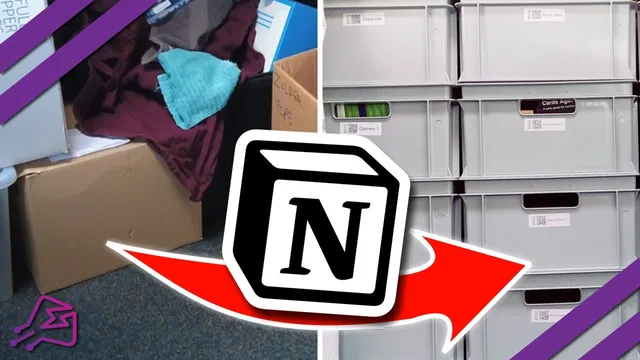
Never lose my stuff again, thanks to Notion
Based on Tools on Tech's video on YouTube. If you like this content, support the original creators by watching, liking and subscribing to their content.
Use Euro Norm boxes instead of non-guaranteed bin lines so replacements remain available and stacking stays consistent.
Briefing
A cluttered attic becomes searchable and portable by pairing standardized storage boxes with a Notion database—so items can be found quickly without digging through piles for days. The core move is switching from Ikea bins, which can disappear when collections change, to Euro Norm boxes designed to be replaceable long-term. These boxes come in an industrial standard size used across Europe, and their dimensions scale predictably, letting owners stack and mix them while keeping the whole system consistent across years and even across different homes.
The physical setup is built for durability and reusability. The boxes are made from recycled plastic, and the labeling strategy is designed to survive future moves: the same numbered boxes can be carried to a new house and stacked in whatever storage layout fits. Because the attic is on a slope, the system also accounts for practical access—when boxes are pulled out, the bottom boxes sit higher/longer due to the angle, while smaller boxes remain easier to reach. A key behavioral insight emerges from using the system: boxes used more often naturally migrate toward the top, while rarely accessed items settle toward the bottom, reducing the pain of repeatedly reaching deep into storage.
To make the boxes “findable,” each container gets an individual number and a QR code label. The QR code is generated via a Dymo label printer (with any label software capable of producing QR codes), and Notion stores the corresponding URL so the code links back to the right record. The workflow is intentionally simple: the box name on the label is enough for quick decisions, while Notion is used for double-checking details when away from the system or when the label alone isn’t sufficient.
Notion ties the physical inventory to a mobile-friendly reference. A free “jumpstart” template (linked in the description) uses a single table with auto ID generation and location fields to track boxes across places like the attic and a studio. It includes an overview with pictures of what’s inside each box, an archive area for boxes no longer needed, and a “Dymo label export” feature that prints labels in batches—saving time compared with generating and printing one label at a time.
The design philosophy is to avoid over-engineering. The initial home version stays minimal: one entry per box, with details stored directly in the page, plus just enough automation (ID and URL generation) to keep labeling and lookup painless. An optional “advanced” paid version is teased for commercial inventory needs, where boxes can be linked to item counts (e.g., pens, cupcakes) through additional tables—useful for stores but unnecessary for personal storage. The result is a system that’s both physical (stackable, standardized, durable) and digital (searchable, QR-linked, mobile accessible), turning long-term storage into something that can be managed in minutes rather than days.
Cornell Notes
The system replaces unreliable, non-standard storage bins with Euro Norm boxes that are designed to be replaceable and stack consistently over time. Each box gets a unique number and a QR code label generated with a Dymo label printer, which links back to a Notion record. Notion acts as a mobile-access inventory: a single-table template tracks box IDs, locations (attic, studio), and an overview with pictures, plus an archive for retired boxes. Batch label export speeds up printing, and the labeling reduces the need to open Notion unless details must be double-checked. The approach stays intentionally simple for home use, while a more complex, paid version is positioned for businesses needing item-level inventory counts.
Why switch from Ikea bins to Euro Norm boxes for long-term storage?
How does the labeling system connect physical boxes to Notion records?
What does the attic’s slope change about how boxes are accessed?
What features in the Notion template make it practical for personal inventory?
Why is the system designed to avoid over-engineering at first?
Review Questions
- How do standardized box dimensions support long-term maintainability and stacking consistency?
- Describe the end-to-end workflow from scanning a QR code to finding the correct box details in Notion.
- What template features reduce friction when labeling and checking inventory from a phone?
Key Points
- 1
Use Euro Norm boxes instead of non-guaranteed bin lines so replacements remain available and stacking stays consistent.
- 2
Label every box with a unique number and a QR code that links to its Notion record.
- 3
Generate QR codes with a Dymo label printer and store the destination URL in Notion for reliable lookup.
- 4
Keep the Notion setup simple for home use: one table with one entry per box, plus auto ID and location fields.
- 5
Add an overview with pictures and an archive section to keep the system usable as boxes come and go.
- 6
Print labels efficiently using a batch “Dymo label export” workflow rather than one-by-one creation.
- 7
Reserve advanced, item-level inventory linking for commercial needs, since it’s overkill for personal attic tracking.