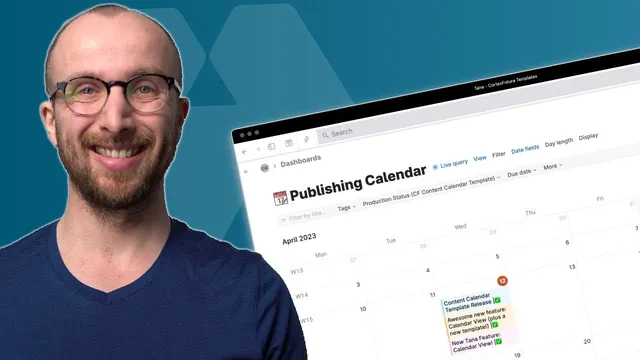
New Tana Feature: Calendar View!
Based on CortexFutura Tools's video on YouTube. If you like this content, support the original creators by watching, liking and subscribing to their content.
Start with a Content kernel super tag to capture inspiration, then link every later content piece back to that kernel using the “stems from” field.
Briefing
Tana’s new calendar view becomes the centerpiece of a full content system built from scratch: ideas get tagged as “content kernels,” individual pieces of content inherit shared fields like planned and actual publication dates, and everything can be organized into “content campaigns” that flow across weeks. The payoff is a calendar that doesn’t just display dates—it automatically reflects how content is planned, published, and re-framed over time.
The setup starts with a foundational super tag called a “Content kernel,” a place to capture inspiration the moment it appears—whether that’s a quote from a book or a stray idea. From there, a “section” of super tags is created to represent content types: Twitter threads, YouTube videos, newsletter issues, and blog articles. These content-type super tags inherit from the main Content super tag so they can be searched and managed together later, even though they’re different formats.
To make scheduling and workflow consistent, the system defines reusable fields under a shared Fields area. Two key fields drive the calendar: “Planned publication date” (a date field so it can render on the calendar) and “Production status” (an options field with stages like idea, researching, writing, filming, editing, ready to publish, scheduled, and published). A third field, “stems from,” links each piece of content back to the Content kernel it was derived from, enabling automatic “derived content” views that answer questions like: what has already been published from this idea?
A parallel organizing layer is added through “Content campaign.” Each piece of content can be assigned to a campaign instance—such as a product launch—so multiple posts across days or weeks can share a common goal. Live searches are then built to pull related items together: one search surfaces all content derived from a kernel, and another surfaces all content belonging to a campaign. These searches become the backbone for calendar views.
The calendar view itself turns the “campaign calendar” live search into a monthly grid. Nodes appear on the planned date, but the system also accounts for actual publication: when the “actual publication date” differs from the plan, the item shows up multiple times on the calendar. Items can be dragged to new dates, and new content created inside the calendar inherits the correct tag color and campaign structure automatically. For more precision, the calendar supports week views and time-of-day scheduling—dragging an item can adjust the date field down to specific times.
The calendar also supports practical control features: filtering by production status via live search (so only “researching” items appear), planning campaigns across a date range by giving the campaign itself a date system, and using multi-day spans for longer-running work. Clicking an event opens the underlying content node for editing, while view settings like day length let users focus on working hours.
For people who don’t want to build it manually, a free template can be imported into a Tana workspace, but the core concept remains the same: tag ideas once, derive content automatically, and let calendar view reflect both planning and reality across campaigns.
Cornell Notes
The system builds a content workflow in Tana that connects three layers: ideas (Content kernels), content formats (Twitter threads, YouTube videos, newsletter issues, blog articles), and goals over time (Content campaigns). Shared fields—especially “Planned publication date” and “Production status”—make every content item schedulable and filterable. “Stems from” links each piece back to its originating kernel, while live searches generate “derived content” and “campaign content” collections. Tana’s calendar view then renders these live searches, showing planned dates and also duplicating items when actual publication dates differ. The result is an always-up-to-date scheduling dashboard that supports drag-and-drop rescheduling, time-of-day precision, and status-based filtering.
What is a “Content kernel,” and why is it the starting point for the system?
How do “Planned publication date” and “Production status” work together in the calendar?
What does inheritance accomplish with the content-type super tags?
How does “stems from” enable automatic “derived content” collections?
What is a “Content campaign,” and how does it structure scheduling across multiple posts?
How does calendar view handle planned vs actual publication dates and rescheduling?
Review Questions
- How would you use “stems from” and the derived-content live search to audit whether an idea has already been turned into published content?
- If a campaign has items in multiple production statuses, how can live search filtering change what appears on the calendar?
- What configuration choices make “Planned publication date” render on the calendar, and how does calendar view behave when actual publication dates don’t match the plan?
Key Points
- 1
Start with a Content kernel super tag to capture inspiration, then link every later content piece back to that kernel using the “stems from” field.
- 2
Create a shared Content super tag and extend it for each format (Twitter threads, YouTube videos, newsletter issues, blog articles) so common fields stay consistent.
- 3
Use “Planned publication date” as a date field and “Production status” as an options field to make items both schedulable and filterable.
- 4
Add “Content campaign” to assign content to a goal (like a product launch), then build live searches that pull campaign content into a calendar view.
- 5
Leverage Tana’s calendar view to show planned dates, reflect actual publication differences (including duplicate appearances), and reschedule items via drag-and-drop.
- 6
Use live search filters (e.g., production status = researching) to create focused calendar views that reflect work-in-progress.
- 7
Plan campaigns across time by giving campaign instances a date system range, then render those campaign ranges in calendar-based live searches.