Notion at Work: The Versatile if() Function
Based on Notion's video on YouTube. If you like this content, support the original creators by watching, liking and subscribing to their content.
The IF function automates outputs by evaluating a true/false condition and returning one value for true and another for false.
Briefing
The IF function in Notion is a condition-driven workhorse that turns database data into automated outputs—whether that means pass/fail labels, letter grades, project statuses, or task priorities. By evaluating a true/false condition and returning one value for “true” and another for “false,” it streamlines workflows that would otherwise require manual updates, especially when paired with properties like numbers, dates, checkboxes, relations, and rollups.
At its core, the IF function takes three arguments. The first is a boolean expression that resolves to true or false—often a comparison such as “less than” or “greater than,” or an equality check against a property value. The second argument is the value to return when the condition is true, and the third is the value to return when the condition is false. A simple example like “2 < 3” evaluates to true, producing a checkbox-style true/false outcome, while reversing it to “2 > 3” evaluates to false. In a more practical form, an IF statement can read like: “if score is at least 70% return ‘pass’, otherwise return ‘fail’.” When the underlying score property changes (for example, lowering a student’s score from 70% to 68%), the status updates automatically.
Most real use cases need more than two outcomes, and Notion handles that by nesting IF functions. One example assigns letter grades from exam scores using a chain of thresholds: scores ≥ 90% become A, ≥ 80% become B, ≥ 70% become C, ≥ 60% become D, and anything below becomes F. The logic is built as an outer IF with additional IFs placed into the “else” branches, creating multiple decision paths. The transcript also notes a practical workflow tip: complex nested formulas are easier to draft in a code block (with indentation for readability) and then paste into the formula property after removing line breaks.
The IF function also automates project management. A projects database can compute progress via a rollup from related tasks—specifically, rolling up each task’s checkbox “complete” state into a percentage. With that progress value, another nested IF assigns project status: 0% maps to “planned,” 100% maps to “complete,” and anything in between maps to “in progress.” As checkboxes on tasks change, the project status updates automatically.
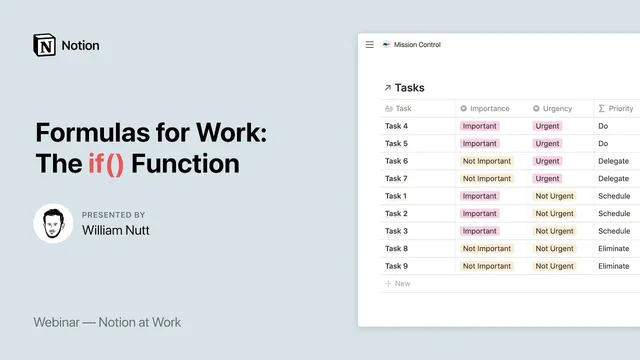
Finally, IF supports prioritization using the Eisenhower Matrix. Tasks store two select properties—importance (important / not important) and urgency (urgent / not urgent). A nested IF generates an action: important + urgent becomes “do the task,” important + not urgent becomes “schedule,” not important + urgent becomes “delegate,” and not important + not urgent becomes “eliminate.” A second formula then converts those actions into sortable numeric priority values (due=1, schedule=2, delegate=3, eliminate=4), enabling correct ordering beyond alphabetical sorting.
Questions at the end touched on alternatives like a ternary/short-form conditional operator (mentioned as a possible shortcut), whether to build formulas in code blocks versus the formula field (code blocks help with nested structure), and whether there’s a limit to nesting depth (no known hard limit was provided, though deep nesting was said to work in practice). Free templates for the examples were offered via Notion Market under notion.vip.
Cornell Notes
The IF function in Notion returns different results based on a condition that evaluates to true or false. It uses three arguments: (1) a boolean expression (often a comparison against a property), (2) the value to return when the condition is true, and (3) the value to return when the condition is false. For more than two outcomes, Notion supports nesting IF functions so each “else” branch can contain another IF, creating multiple decision paths. The transcript demonstrates this with letter grades from exam scores, project status derived from rollup progress, and Eisenhower Matrix task actions derived from importance/urgency. These patterns matter because they automate labels and workflows directly from database data, reducing manual updates.
How does Notion’s IF function decide what output to produce?
What’s the practical pattern for turning a numeric score into pass/fail in a database?
How can multiple letter grades (A/B/C/D/F) be generated from one score property?
How does IF connect to rollups and relations to automate project status?
How is the Eisenhower Matrix implemented with IF in Notion?
What workflow tip helps when building complex nested IF formulas?
Review Questions
- When writing an IF formula, what do the second and third arguments represent, and how do they relate to the boolean expression in the first argument?
- How does nesting IF functions change the number of possible outputs compared with a single IF?
- In the Eisenhower Matrix example, what combination of importance and urgency maps to “delegate,” and how is that turned into a sortable priority number?
Key Points
- 1
The IF function automates outputs by evaluating a true/false condition and returning one value for true and another for false.
- 2
IF uses three arguments: a boolean expression, the true-case return value, and the false-case return value.
- 3
More than two outcomes are handled by nesting IF functions inside the true/false branches to create multiple decision paths.
- 4
Letter grades, pass/fail labels, and other multi-threshold classifications can be built by chaining nested IF checks from highest to lowest thresholds.
- 5
Project status can be driven by rollup-based progress computed from related tasks’ checkbox completion.
- 6
Task prioritization can be generated from Eisenhower Matrix inputs (importance and urgency) using nested IF, then converted into numeric priority values for correct sorting.
- 7
For complex nested formulas, building in a code block first can make the nesting structure easier to manage before pasting into the formula property.