Notion Template: Simple Reading Log With Progress Bar
Based on Red Gregory's video on YouTube. If you like this content, support the original creators by watching, liking and subscribing to their content.
Use two linked Notion databases—Bookshelf for book metadata and Reading Check-in for session details—to make progress update automatically.
Briefing
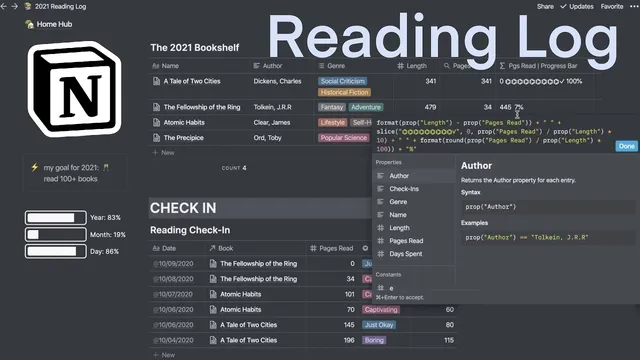
A Notion reading hub can be built entirely inside the platform by pairing two linked databases—one for a “bookshelf” and one for individual reading sessions—then using rollups and formulas to generate a live progress bar. The core setup keeps book metadata (title, genre, author) in a bookshelf database, while each reading check-in records when reading happened, how long it lasted, how many pages were read, and a quick “enthusiasm” rating. A relation field connects each check-in back to its book, and a rollup sums pages read across all sessions so progress updates automatically as new entries are added.
The template’s practical friction point is how to store dates without breaking the ability to use calendar-style views. Instead of using a dedicated date property for the check-in entry title, the workflow uses the entry title itself as the date (formatted month/day/year). That choice makes it easy to create a calendar view while still keeping the book title out of the check-in database—book identity comes from the relation to the bookshelf. Each check-in then includes pages read, minutes read, and a dropdown for the reading mood (captivating, boring, or just okay), plus a “book” relation that links back to the correct bookshelf record.
Once the databases are connected, the progress bar is driven by three computed layers. First, a rollup aggregates total pages read from all related check-ins. Second, a formula calculates pages left as length minus pages read, where “length” is a numeric property on the bookshelf entry. Third, another formula turns the percentage of completion into a text-based progress bar made of emojis: it slices the emoji string based on (pages read ÷ length) and adds a completion checkmark at 100%. A separate formula rounds the completion percentage and appends a “%” label.
The template also tracks “days spent” reading a book by counting how many check-in entries exist. Because Notion rollups and text outputs can produce comma-separated results, the approach counts commas in the rollup output, then adds one to convert that into an entry count (commonly interpreted as days). The creator notes a quirk: emoji display doesn’t appear until a certain threshold (around 10%), so the formula is adjusted to ensure at least one emoji shows even when progress is low.
For presentation, the page design uses an embedded widget from indiefy.co to add a clock and a progress bar area, with dark mode toggles. Finally, the template rounds out session detail with a “chapters” multi-select property (built quickly by generating comma-separated values in a text field and converting them into a multi-select). While integrations like Readwise and Goodreads are mentioned as alternatives, the emphasis stays on a self-contained Notion-only system that updates progress automatically through relations, rollups, and formulas—no external API required for the core reading log experience.
Cornell Notes
The reading-log template uses two linked Notion databases: a Bookshelf database for book metadata and a Reading Check-in database for each reading session. A relation field links every check-in back to its book, and a rollup sums “pages read” across all related sessions. Formulas then compute pages left (length minus pages read) and convert completion percentage into an emoji progress bar that fills as reading accumulates, including a checkmark at 100%. Additional formulas estimate “days spent” by counting check-in entries via comma counting in rollup output. The result is a self-updating reading hub with session tracking (minutes, pages, enthusiasm) and a visual progress indicator.
How do the two databases work together to keep progress automatic?
Why is the check-in entry title used as the date instead of a date property?
What formula logic turns reading progress into an emoji progress bar?
How is “days spent” reading calculated from check-ins?
How are multi-select chapter values created quickly?
What’s the role of indiefy.co widgets in the template?
Review Questions
- If a book’s “length” is 300 and the rollup sum of “pages read” across check-ins is 75, what completion percentage and emoji-slice input would the progress formulas use?
- Why does counting commas in a rollup output require adding 1, and what does that represent in terms of check-in entries?
- What changes would be needed if the template switched from using the check-in title as the date to using a dedicated date property?
Key Points
- 1
Use two linked Notion databases—Bookshelf for book metadata and Reading Check-in for session details—to make progress update automatically.
- 2
Link each reading session to its book with a relation field, then sum “pages read” via a rollup to drive progress calculations.
- 3
Store the check-in date in the entry title (month/day/year) to support calendar-style viewing while keeping the book identity handled by relations.
- 4
Compute pages left as length minus total pages read, and generate an emoji progress bar by slicing a string based on (pages read ÷ length).
- 5
Display completion percentage by rounding (pages read ÷ length) × 100 and appending a “%” label in a formula property.
- 6
Estimate “days spent” by counting check-in entries using comma counting from rollup text output, then adding one to convert commas to entry count.
- 7
Speed up multi-select setup (like chapters) by entering comma-separated values in a text property and converting it to a multi-select.