Notion's new Dashboards: Everything you need to know
Based on Thomas Frank Explains's video on YouTube. If you like this content, support the original creators by watching, liking and subscribing to their content.
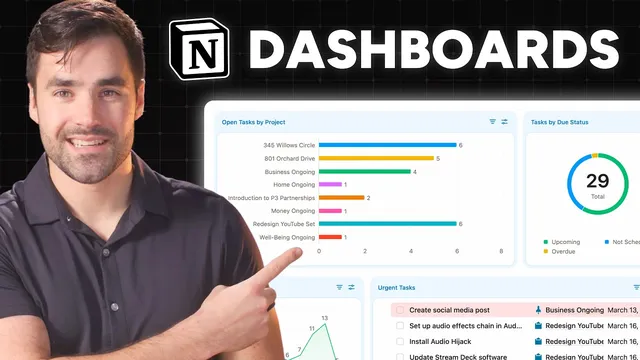
Dashboards are a dedicated database layout type that provides a widget canvas, replacing fragile page-built dashboards made from columns and linked database blocks.
Briefing
Notion’s new Dashboards feature turns database views into a “widget canvas,” making it far easier to build multi-chart, multi-list command centers—while also locking down edits by default. Instead of assembling dashboards from columns plus linked database blocks (a setup that can be fragile and requires page-level locking to prevent accidental changes), a dashboard view is a dedicated database layout type where each widget is its own linked database view. Users can mix widgets from one or multiple data sources, duplicate existing widgets quickly, and rearrange them without rebuilding the underlying page structure.
The practical payoff is speed and safety. In the old approach, complex dashboards often relied on manually placed blocks and linked views, which teams could easily disrupt unless the entire page was locked. Dashboards shift that workflow: the dashboard starts in view mode, allowing interaction like drilling into chart data and opening items, but restricting configuration changes until the user switches into an explicit edit mode. That means teams can share dashboards without needing to freeze the whole page just to protect layout and settings.
Under the hood, Dashboards are “another layout type” for database blocks, but with a key difference: a single dashboard view acts like a canvas that can host multiple widgets, each pulling from a chosen data source. When creating a widget, users can select from existing views tied to that data source, then replicate them to build out repeated dashboard sections faster. The feature also supports mixing view types—charts, lists, and tables—within the same dashboard, and it allows multiple rows and widget resizing/reordering to create a more dashboard-like layout.
That said, Dashboards have sparked controversy because the feature is gated behind Notion’s $20 per month Business plan. Critics argue it’s mostly a new UI for capabilities already achievable with linked database blocks and chart views. The creator’s response is that the functionality is similar in many respects—except for one major upgrade: Dashboards can be used inside tabbed layouts within database pages. Tabbed layouts previously worked as a single view of a data source (often via relations), but Dashboards let each tab contain multiple widgets that can pull from multiple data sources.
This matters for real-world templates. A common pattern in productivity systems is a “project” page that shows tasks and notes together. With traditional linked database blocks, updating the layout logic later can require editing every existing page individually because blocks live in each page’s content area. Dashboards inside tabs behave more like a configuration of the database UI: changes to widget filters and settings propagate across all pages in the database. The result is less maintenance and more consistent updates.
Finally, the Business-plan gate isn’t only about monetization. Chart views are computationally expensive because they may require server-side calculations across large databases, and dashboards make it easier to create many charts and complex configurations on a single page. Limiting access helps control server load by reducing how many users can build heavy, chart-dense dashboards at scale.
Cornell Notes
Notion’s Dashboards introduce a new database layout type that works like a widget canvas. Each dashboard contains multiple widgets, and each widget is essentially its own linked database view, allowing charts, lists, and tables to be combined—often even across multiple data sources. Dashboards start in view mode, so teams can interact with data without accidentally changing widget configuration; edit mode is required for changes. The biggest functional leap comes from using Dashboards inside tabbed layouts, enabling multi-widget tabs that pull from multiple sources and propagate filter/layout updates across all pages in a database. The feature is gated behind the Business plan partly because chart-heavy dashboards are computationally expensive to run server-side.
How do Dashboards differ from building a “dashboard” using columns and linked database blocks?
What does a dashboard widget actually connect to?
Why is using Dashboards inside tabbed layouts a bigger deal than the UI change alone?
How do Dashboards reduce maintenance compared with traditional linked database blocks on pages?
Why is Dashboards gated behind the Business plan, beyond pricing strategy?
Review Questions
- What specific mechanism makes Dashboards safer for team collaboration compared with page-based linked database dashboards?
- How does placing a Dashboard inside a tabbed layout change what a tab can display compared with a traditional tabbed layout?
- Why are chart-heavy dashboards described as computationally expensive, and how does that relate to the Business-plan gate?
Key Points
- 1
Dashboards are a dedicated database layout type that provides a widget canvas, replacing fragile page-built dashboards made from columns and linked database blocks.
- 2
Dashboards default to view mode, restricting widget configuration changes until edit mode is enabled, reducing accidental edits on shared pages.
- 3
Each dashboard widget is a linked database view, letting users combine charts, lists, and tables within one layout and mix data sources when needed.
- 4
The most significant functional upgrade is using Dashboards inside tabbed layouts, enabling multi-widget tabs that pull from multiple data sources.
- 5
Dashboard changes propagate across all pages in the database when configured at the tab/dashboard level, unlike traditional linked blocks that often require per-page updates.
- 6
The Business-plan gate is tied not only to monetization but also to server cost: chart views can require expensive server-side calculations across large databases.