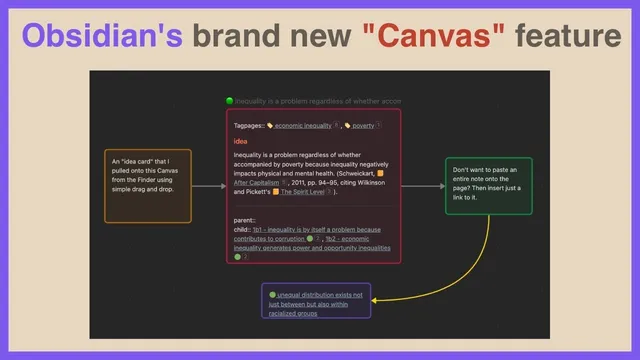
Obsidian's new "Canvas" feature - oh my!
Based on FP's video on YouTube. If you like this content, support the original creators by watching, liking and subscribing to their content.
Obsidian Canvas provides a visual, card-based workspace inside a vault for organizing research ideas.
Briefing
Obsidian’s new “Canvas” feature turns a note vault into a visual workspace where cards can be arranged, connected, and resized—making it easier to build research structures without leaving the app. Access is currently limited to an “Insider’s build,” with the creator describing VIP status as the route to early access. Once enabled, Canvas appears as a dedicated interface inside an Obsidian vault, letting users drag in content, snap elements into alignment, and create relationships between ideas using arrows.
The workflow starts from Obsidian’s command palette: users can create a new canvas, then add cards either by dragging from the vault or by double-clicking to spawn a card. The interface supports practical layout controls such as grid snapping (to keep cards neatly aligned), card resizing (to fit more or less text), and card color (including a purple theme for emphasis). Connections between cards are created by dragging a dot/handle from one card to another, producing arrows that can also be color-coded—useful for distinguishing types of relationships.
Canvas also supports multiple ways to bring existing knowledge into the workspace. Users can drag entire notes onto the canvas, where the note becomes a scrollable, editable card. For more lightweight referencing, a user can create a card that contains a link to a note using Obsidian’s double-bracket syntax (e.g., [[note]]), so the canvas holds a navigable reference rather than duplicating the whole note. The feature extends beyond vault content too: users can paste a URL onto the canvas to embed a web page that can be scrolled directly alongside their notes, enabling side-by-side research without switching contexts.
The transcript highlights a real-world use case: the creator’s “claim pages,” described as backups of Zettelkasten-style idea cards, can be dragged onto the canvas and edited in place. The URL embedding is compared to functionality seen in Cosmic’s web browser app (Cosmic), while the creator notes using Arc as their browser and pasting the copied page link into Canvas for in-canvas reading.
Finally, the discussion shifts to market impact. Some users are concerned that Canvas could reduce demand for standalone visual knowledge apps such as Scrintal and Heptabase, which are designed for ready-made research workflows. The creator argues that those apps may still appeal to people who want a simpler, out-of-the-box experience, while Obsidian’s flexibility may require a learning curve. The open question: whether Canvas makes Obsidian a direct substitute for these tools, or whether both categories can coexist—depending on how much structure users want immediately versus how much customization they’re willing to learn.
Cornell Notes
Obsidian’s Canvas feature adds a visual, card-based workspace inside a note vault, aimed at organizing research ideas with less friction. Users can create cards, resize and color them, enable grid snapping for alignment, and connect cards with arrows (including color-coded arrows). Canvas can ingest full vault notes as editable, scrollable cards, or create lightweight reference cards using double-bracket links. It also supports pasting URLs so web pages can be scrolled directly on the canvas next to related notes. Because Canvas is currently available via an Insider build and VIP access, it raises questions about whether it will compete with standalone visual PKM apps like Scrintal and Heptabase.
How does someone start using Obsidian Canvas, and what controls help keep the layout usable?
What are the main ways Canvas brings existing knowledge into the workspace?
How are relationships between ideas represented in Canvas?
Why does embedding web pages matter for research workflows?
What competitive concern comes up, and what’s the counterpoint?
Review Questions
- Describe two different methods Canvas uses to connect a canvas card to an existing note, and explain when you’d prefer each method.
- What layout and relationship tools does Canvas provide (e.g., snapping, arrows, resizing), and how do they support building a research map?
- How does Canvas’s URL embedding change the way sources can be organized compared with relying on separate browser tabs?
Key Points
- 1
Obsidian Canvas provides a visual, card-based workspace inside a vault for organizing research ideas.
- 2
Canvas creation can be done via the command palette (“canvas”) and cards can be added by dragging from the vault or double-clicking the canvas.
- 3
Grid snapping, card resizing, and card color help keep layouts readable and structured.
- 4
Connections between cards are drawn with arrows created by dragging from one card to another, with optional arrow color changes.
- 5
Canvas can ingest full notes as editable, scrollable cards or create lightweight reference cards using double-bracket links.
- 6
Pasting a URL embeds a scrollable web page directly on the canvas, enabling side-by-side source review.
- 7
Canvas raises competitive questions for Scrintal and Heptabase, but simpler out-of-the-box apps may still appeal to users who want less setup.