Snipd: The Best Podcast App for Knowledge Management (Snipd + Readwise Workflow)
Based on Systematic Mastery's video on YouTube. If you like this content, support the original creators by watching, liking and subscribing to their content.
Snipd captures podcast moments with a one-button “create snip” flow that generates AI takeaways, an AI title, and tags.
Briefing
Snipd is positioned as a fast “capture-and-convert” system for podcast knowledge: while listening, a single button turns a selected moment into an AI-generated snippet with takeaways, a title, and tags—without stopping the flow of listening. The core promise is retention. Instead of relying on memory, manual notes, or voice memos (which break focus and depend on recalling the exact wording), Snipd aims to preserve “golden nuggets” from technical podcasts so they can be reviewed later.
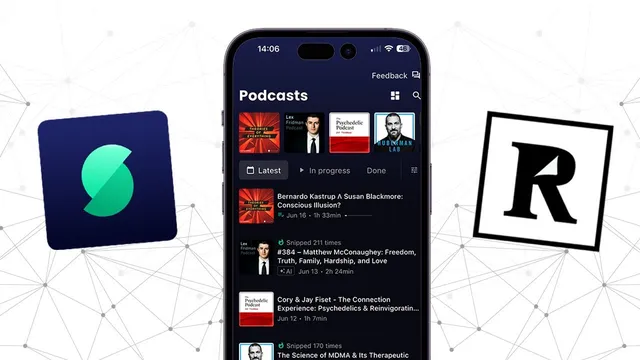
The workflow is built around two apps: Snipd for capturing and Readwise for daily review. On an iPhone, Snipd behaves like a typical podcast app for subscriptions—technical shows such as “Theories of Everything,” “Lex Fridman,” and “Psychedelic” content—then adds a knowledge-management layer. When a listener hears something worth keeping, they press “create snip.” The app extracts the relevant moment and generates a snippet that includes “five key takeaways” from that short segment. Users can fine-tune the snippet boundaries (start/end) and edit the AI-generated title if needed, then add a private note and tags (for example, “neuroscience” and “psychedelics” for an MDMA-related clip). Snipd also supports posting snippets into groups, letting others see what’s being saved and follow people whose selections match their interests.
A concrete example centers on a podcast segment about MDMA’s therapeutic effects for PTSD. After selecting a point in the episode, Snipd produces a snippet summarizing observed changes in brain connectivity—specifically weakening connections between the amygdala and the insula, and related connectivity involving the hippocampus—then distills the moment into five AI-generated takeaways. The emphasis is that the capture happens “on the go,” with minimal interruption.
The second step—Readwise—turns those saved snippets into a spaced-repetition routine. Readwise organizes highlights and insights into flashcards, which can be reviewed daily (the user mentions choosing a range like 5 to 15 flashcards per day). The practical payoff is that podcast and book knowledge becomes something revisited regularly rather than something consumed and forgotten. The transcript describes a user who previously remembered only a small fraction of what they read or listened to, then found the daily flashcard review made the information stick and feed into practice.
A key operational detail is a Readwise setting: a “highlight quality filter” can cause Snipd-imported highlights to be treated as low quality and filtered out. Turning that filter off is presented as necessary for Snipd snippets to appear in Readwise.
Finally, Snipd’s roadmap is mentioned: AI-generated podcast summaries are said to be in development, with at least one example podcast (Lex Fridman) reportedly offering this feature. The overall message is a streamlined, two-app system for capturing podcast insights and converting them into daily, reviewable knowledge.
Cornell Notes
Snipd turns podcast “golden nuggets” into AI-generated snippets in seconds. A listener presses a button at a chosen moment, then gets a snippet with an AI title, editable start/end boundaries, tags, and “five key takeaways,” avoiding manual note-taking or relying on memory. Those snippets sync into Readwise, where they become flashcards reviewed daily (e.g., 5–15 cards), helping convert consumed content into retained knowledge. A crucial setup step is disabling Readwise’s highlight quality filter so Snipd imports aren’t automatically treated as low quality and hidden. The workflow is framed as simple—two apps—with optional social posting and potential future AI podcast summaries.
How does Snipd capture knowledge from podcasts without interrupting listening?
What does the MDMA/PTSD example illustrate about Snipd’s output?
Why is Readwise integrated into the workflow, and how is it used day-to-day?
What Readwise setting can prevent Snipd snippets from appearing?
What extra features beyond personal knowledge capture does Snipd offer?
Review Questions
- What steps are involved from selecting a podcast moment in Snipd to reviewing it in Readwise?
- Why might Snipd highlights fail to appear in Readwise, and what setting addresses that?
- How do editable snippet boundaries and AI-generated takeaways reduce the need for manual note-taking?
Key Points
- 1
Snipd captures podcast moments with a one-button “create snip” flow that generates AI takeaways, an AI title, and tags.
- 2
Editing snippet boundaries (start/end) helps correct what the AI extracts from the selected audio segment.
- 3
Readwise turns Snipd imports into daily flashcard reviews, aiming to improve retention of podcast and book insights.
- 4
A Readwise “highlight quality filter” can hide Snipd-imported highlights; disabling it is necessary for syncing to work as expected.
- 5
Snipd’s tagging and private notes support organizing knowledge by themes (e.g., neuroscience, psychedelics).
- 6
Snipd includes optional social posting into groups, enabling community discovery of what others save.
- 7
Snipd is working toward AI-generated podcast summaries, with at least some podcasts reportedly already offering this functionality.