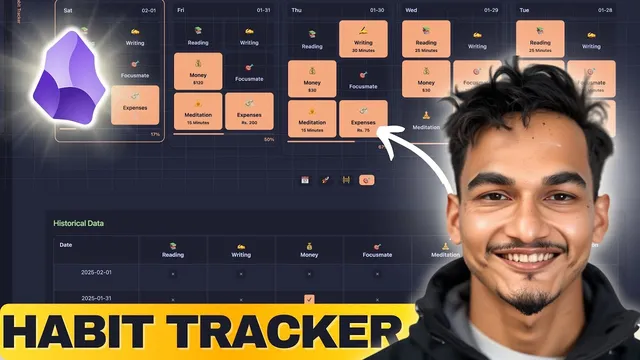
The Ultimate Habit & Goal Tracker System For Obsidian
Based on Prakash Joshi Pax's video on YouTube. If you like this content, support the original creators by watching, liking and subscribing to their content.
Install DataCore via BRAT because it isn’t available in the standard community plugin store, then enable it before the tracker will render.
Briefing
A fully built habit-and-goal tracker for Obsidian is presented as a “standalone” system that turns daily notes into weekly targets, monthly targets, trends, and completion metrics—without relying on manual spreadsheets or constant reconfiguration. The core payoff is a dashboard that automatically reflects the last several days (and, by scrolling, earlier ranges), while also breaking goals into weekly projections and showing how many “perfect days” (days where all tracked habits hit completion) actually occurred. For users who already log habits in Obsidian daily notes, the system aims to make progress tracking feel as direct as a dedicated app, while keeping all data stored in the journal.
The setup centers on an Obsidian DataCore-based habit tracker built on top of DataCore (described as a successor to the older Obsidian Data plugin). A large code block is copied into a new note file in the vault, and the tracker renders in preview mode. Because DataCore isn’t available in the standard community plugin store, installation requires a beta-testing workflow using the BRAT plugin to add the DataCore plugin via a provided link. Once DataCore is enabled, the habit tracker note shows a preview layout that remains empty until the user points it at the correct daily note folder and creates daily notes.
Configuration then narrows to a few specific edits. First, the “source query” must be updated so the tracker knows where daily notes live (the transcript uses a Journal path example). After daily notes exist, the tracker’s habit tiles begin to populate and historical views start working. Second, each habit is configured in a single source section with an ID, emoji, label, and a “default duration” (the completion threshold). The system is designed around numeric habits—minutes, pages, steps, or even money—rather than inline DataView-style fields. Clicking a habit tile adds the configured default value into the daily note; editing the value updates completion status and the dashboard immediately.
The tracker also supports goal tracking through monthly targets (and weekly targets derived from them). Monthly goals are configured as additional properties, then the dashboard projects weekly progress and displays trends across habits. A “perfect days” counter marks days where all habits meet their completion thresholds, and a history view lets users toggle and edit past entries to see completion-rate changes (100%, 75%, 50%, 25% style breakdowns).
To make the workflow smoother, two Mac utilities are recommended: Quick Sticky Notes for always-on-top reference notes, and Voice In (voice-to-text) to auto-generate daily logs with AI enhancement. The transcript’s practical message is that once daily notes are being written consistently, the habit tracker can run in preview mode like a real app—turning those notes into measurable habit and goal progress with weekly/monthly structure and trend visibility.
Cornell Notes
The Obsidian habit-and-goal tracker system turns daily journal notes into an interactive dashboard that shows recent habit completion, weekly targets, monthly targets, trends, and “perfect days.” It’s built on DataCore (a successor to the older Data plugin), with the tracker note rendering from a large code block copied into a new file and configured to point at the correct daily note folder. Users then define each habit’s ID, label, emoji, and a numeric completion threshold (“default duration”), so clicking a habit tile adds the default value into the daily note and updates completion. Monthly goals are configured as additional properties, and weekly projections plus trend views update automatically. The result is progress tracking that behaves like a standalone app while keeping all data in daily notes.
What makes this habit tracker different from earlier Obsidian approaches like DataView or external spreadsheets?
Why is DataCore installation more involved than typical Obsidian plugins?
What are the two most critical configuration edits before the tracker starts showing data?
How does the system decide whether a habit is “completed”?
How do monthly goals and weekly targets work together in the dashboard?
Review Questions
- Which part of the setup determines where the tracker reads daily habit data from, and what happens if daily notes don’t exist in that folder?
- How would you adapt this system for a checklist habit instead of a numeric habit? What numeric mapping is suggested?
- If a habit’s default duration is changed (e.g., reading from 25 to 40 minutes), what downstream dashboard elements should update and why?
Key Points
- 1
Install DataCore via BRAT because it isn’t available in the standard community plugin store, then enable it before the tracker will render.
- 2
Copy the provided habit-tracker code into a new Obsidian note file in the vault and rely on preview mode for the dashboard to function.
- 3
Update the “source query” path so the tracker points to the folder where daily notes actually live (e.g., the Journal folder).
- 4
Define each habit once with ID, emoji, label, and a numeric completion threshold (“default duration”) so clicking a habit tile writes the default value into the daily note.
- 5
Use numeric units for best results—minutes, pages, steps, or money—since completion and targets are computed from numeric values.
- 6
Configure monthly goals as additional properties; weekly targets and trend/projection views are derived from those monthly targets.
- 7
Leverage the history view to edit past daily entries and immediately see completion-rate changes and habit completion behavior.