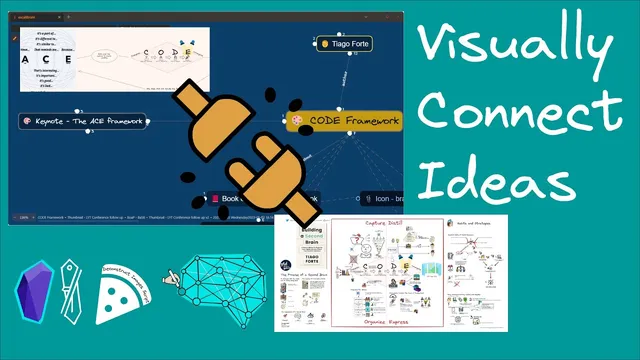
The Visual Thinking Framework with Obsidian and Excalidraw: Making Visual Connections between Notes
Based on Zsolt's Visual Personal Knowledge Management's video on YouTube. If you like this content, support the original creators by watching, liking and subscribing to their content.
Embed framework images inside page summaries so related ideas become clickable navigation targets across notes.
Briefing
A practical workflow for building “visual thinking” links inside Obsidian: embed key visual frameworks from one set of notes into another, then reuse and reinsert selected parts of drawings so ideas stay connected across contexts. The core move is simple—turn a snippet of text or an image fragment into a standalone Excalidraw drawing (or insert it as an image) and keep the resulting artifact linked back to the original sources. That way, a quote captured during one talk can immediately become a visual map inside notes from a different talk, without losing traceability.
The walkthrough starts with a keynote note and a cross-reference to a well-known personal knowledge management framework. Notes taken during Nick Milos’s keynote mention the ACE framework (capture, organize, distill, express). In the same Obsidian workspace, the creator has an embedded image from Thiago Forte’s “Building a Second Brain” summary page for “How to Take Smart Notes,” which contains the CODE framework. By embedding that image, the system creates a navigable link between the keynote notes and the book summary. In Excalidraw, the ACE framework appears in the center, and clicking the linked CODE framework image jumps to the page where the CODE diagram lives—complete with a child link back to the “Building a Second Brain” summary. The result is an immediate visual bridge: keynote ideas connect to prior reading through clickable, embedded references.
The second example focuses on reusing a visual idea across different meeting notes. During a presentation by Vicky Zhao about holding opposing ideas and building a visual “MOC” (map of content), a quote attributed to Albert Rothenberg—“the construction of oppositions is the most reliable way of generating new ideas”—is added to the notes. Instead of leaving the quote as plain text, the workflow turns it into a reusable visual component. Using an Excalidraw/Obsidian script called “deconstruct selected elements into a new drawing,” the creator selects the quote text inside an existing drawing, runs the script, and names the new drawing “construction of oppositions.” The selected elements are then carved out into a separate drawing while the original drawing remains intact.
Next, the new drawing is inserted into Vicky Zhao’s visual MOC note using Excalidraw’s “insert image or Excalidraw drawing from your Vault” command. After placing the inserted drawing, the original text can be removed, leaving a clean visual reference that now appears in both places. The payoff is visible when returning to the main vault: the same “construction of oppositions” visual artifact is referenced in multiple notes, including the “How to Take Smart Notes” summary and the Vicky Zhao meeting notes. The workflow emphasizes repetition with purpose—carve out reusable visual fragments, then link them back into new contexts so the Obsidian knowledge base becomes more connected, navigable, and engaging.
The closing section shifts from tooling to community: registrations are open for a Visual Thinking Workshop cohort running from the end of May into early July, focused on “deconstructing greatness” by Ron Friedman, with six weeks of reading and processing into visual summaries and permanent notes, plus additional tools and techniques from the framework.
Cornell Notes
The workflow links visual ideas across Obsidian notes by turning selected text or drawing elements into standalone Excalidraw drawings and then reinserting them elsewhere. First, embedded images create clickable connections between a keynote note (ACE framework) and a book summary (CODE framework). Second, a quote about “oppositions” attributed to Albert Rothenberg is searched, added to a drawing, and then extracted into a separate reusable drawing using the script “deconstruct selected elements into a new drawing.” That extracted drawing is inserted into Vicky Zhao’s visual MOC note, keeping the same visual reference available in multiple contexts. The approach matters because it turns scattered notes into a network of linked visual artifacts, improving retrieval and conceptual continuity.
How does embedding an image in a page summary create a usable connection between notes?
What is the purpose of the script “deconstruct selected elements into a new drawing” in this workflow?
How does the workflow move a reusable visual component into a different note (Vicky Zhao’s MOC)?
Why does the creator search for the Rothenberg quote before extracting it into a drawing?
What pattern emerges from using the same visual artifact in multiple places?
Review Questions
- When would you choose to embed an image directly versus extracting elements into a new drawing using “deconstruct selected elements into a new drawing”?
- Describe the steps to reuse a quote as a standalone visual component and insert it into a different Excalidraw note.
- How do clickable links between frameworks (ACE and CODE) change the way ideas are navigated compared with plain-text notes?
Key Points
- 1
Embed framework images inside page summaries so related ideas become clickable navigation targets across notes.
- 2
Use Excalidraw links to jump between visual frameworks (e.g., ACE to CODE) without rebuilding diagrams.
- 3
Find and reuse authoritative text (like the Albert Rothenberg quote) by searching existing notes before creating new visuals.
- 4
Extract reusable visual fragments from drawings with the script “deconstruct selected elements into a new drawing” to avoid duplication.
- 5
Insert extracted Excalidraw drawings into other visual maps using “insert image or Excalidraw drawing from your Vault.”
- 6
Keep the original drawing context while carving out standalone components, enabling consistent reuse across multiple meeting notes.
- 7
Treat visual reuse as a repeatable habit to make an Obsidian workspace more connected and easier to navigate.