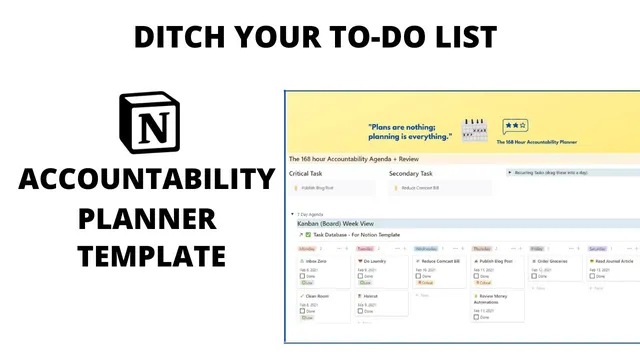
The Weekly Accountability Planner for Notion
Based on Irfan Bhanji's video on YouTube. If you like this content, support the original creators by watching, liking and subscribing to their content.
Use the Weeks template to auto-fill the week beginning date and generate a Monday-through-Sunday board view for planning.
Briefing
A Notion-based “168 hour accountability planner” is built to replace a traditional to-do list with a system that forces weekly reflection, prioritization, and follow-through. The core idea is simple: tasks are easy to capture, but they often don’t translate into completed work. This planner adds accountability by structuring each week around a clear “critical task,” a plan for next actions, and a mandatory weekly review that prevents simply pushing unfinished items forward.
The setup starts on a front page that links two databases: a “Weeks” database and a “Tasks” database. Creating a new week uses a template that auto-fills the week beginning date and sets up a board view for Monday through Sunday. Each week entry can be titled (the creator uses a week number), then favorited so it stays accessible from the dashboard.
Planning begins with preparing for the upcoming week. Users review their inbox—anything from paper notes to mobile app captures—and consolidate it into the Notion task list. The system also supports pulling tasks from other web apps by logging into them within Notion, letting overdue items be reconsidered and assigned into the week. Tasks can be placed on specific days using an “assign to” relational property that links tasks to the week entry. The interface supports quick re-scheduling: tasks can be dragged across the week’s calendar days when Monday or Tuesday gets crowded, and recurring items can be maintained so they automatically appear in future planning.
To keep work actionable, the planner encourages writing tasks in terms of the “next physical action,” borrowing from David Allen’s Getting Things Done approach. A built-in prompt helps users identify the single next step, which the creator frames as a way to reduce the friction that comes from unclear tasks.
The template’s centerpiece is “critical tasks.” Instead of letting small, comfortable items crowd out the important work, the planner asks questions designed to surface the one task that would create the most accomplishment, reduce everything else’s difficulty, and direct the week’s energy. Users choose one critical task (and optionally a secondary task) and also list what they will spend less time doing—explicitly including distractions like mindless YouTube watching—to protect time for the priority.
Accountability is enforced through a weekly review at week’s end (Sundays in the example). Users must answer whether the critical task was completed, then diagnose why—motivation, social pressure, ambition, or obstacles like being too busy, difficulty, not knowing where to begin, or fear. They also review completed tasks, capture notable highlights and struggles, and rate effectiveness on a scale weighted toward completing the critical task. Those weekly ratings roll up across the year so users can see whether their approach is actually moving the needle. The template is offered as a free duplicateable Notion system, with a link to additional reading on the creator’s blog.
Cornell Notes
The planner turns Notion into a weekly accountability system by combining task scheduling with reflection and a weighted effectiveness score. Each week is created from a template that auto-fills the date range and provides a Monday-through-Sunday board view. Tasks are assigned to specific days via a relational “assign to” property, can be dragged to reschedule, and can include recurring items. The key safeguard against procrastination is a “critical task” section that forces one high-impact priority (plus an optional secondary task) and a “spend less time doing” list to block distractions. A mandatory weekly review at the end of the week prevents simply carrying unfinished work forward and uses a rating system that penalizes failure to complete the critical task.
How does the planner prevent a “to-do list” from turning into a collection of unfinished intentions?
What is the role of the “assign to” property and how does it make weekly planning practical?
Why does the template emphasize “next physical action” instead of vague task descriptions?
What questions guide the selection of the weekly “critical task”?
How does the weekly review turn performance into learning rather than guilt?
What does the effectiveness scale measure, and why is it weighted?
Review Questions
- When you create a new week, what fields and views must be set up so tasks can be scheduled correctly across Monday through Sunday?
- What are the specific prompts used to choose a weekly critical task, and how would you decide between a critical task and a secondary task?
- During the weekly review, what causal categories should you record if the critical task wasn’t completed?
Key Points
- 1
Use the Weeks template to auto-fill the week beginning date and generate a Monday-through-Sunday board view for planning.
- 2
Consolidate an “inbox” of tasks into Notion, then assign tasks to specific days using the relational “assign to” property.
- 3
Write tasks as “next physical actions” to reduce hesitation caused by unclear work.
- 4
Pick one weekly “critical task” using targeted prompts about accomplishment, fear, energy, and purpose, and optionally add a secondary task.
- 5
Protect the critical task by listing what to spend less time doing, including common distractions like mindless YouTube watching.
- 6
Reschedule tasks during the week by dragging them to different days when reality changes the plan.
- 7
Complete a Sunday weekly review that diagnoses why the critical task did or didn’t happen and rates effectiveness with a scale weighted toward critical-task completion.