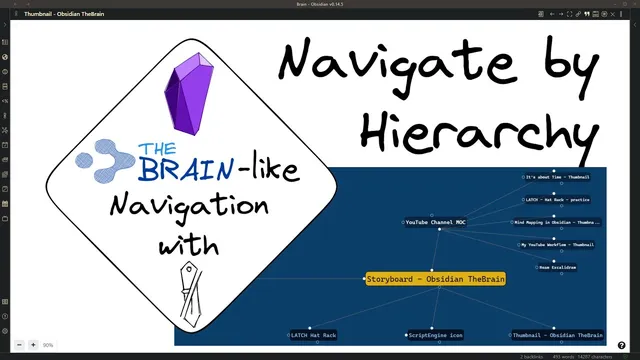
TheBrain-like graph-based navigation in Obsidian.md with Excalidraw and Breadcrumb - LATCH Hierarchy
Based on Zsolt's Visual Personal Knowledge Management's video on YouTube. If you like this content, support the original creators by watching, liking and subscribing to their content.
The Obsidian “brain-like” navigation centers the currently open note and arranges related notes using hierarchy: parents above, children below, siblings to the side, and jumps laterally.
Briefing
A graph-style navigation system for Obsidian vaults is built to mimic the “brain” interface by using hierarchy as the organizing principle—then rendering that structure with Breadcrumbs inside an Excalidraw canvas. The setup centers on one open document as the “central thought,” places related notes into parent/child/sibling positions, and uses lateral “jump” links to move sideways through a knowledge graph. The practical payoff is faster navigation through large vaults: instead of searching or scrolling, users can visually trace how a note fits into a broader structure and then follow the graph outward.
The hierarchy logic is grounded in LATCH, a framework coined by Richard Saul Wurman that lists five ways to organize information: location, alphabet, time, category, and hierarchy. This workflow focuses specifically on hierarchy. In the example, a “storyboard” note sits at the center, with two parents: one representing a YouTube channel map and another representing a “hat rack” category. The note also has children (embedded objects/notes) and siblings (other related items on the same level). On the graph, children appear below, parents above, siblings to the right, and lateral moves (“jumps”) to the left—matching the “brain-like” navigation metaphor.
Breadcrumbs is the key plugin that turns Obsidian relationships into a structured breadcrumb list that the graph interface can render. The configuration matters: Breadcrumbs needs hierarchy settings that define upward relations (parents), downward relations (children), and lateral relations (jumps). The transcript also distinguishes between breadcrumb nodes and other link types: some nodes are “breadcrumbs,” while others are plain links referenced in the document, which can be toggled off if the graph becomes too busy. A critical operational step is initializing the Breadcrumbs index before using the interface—done by opening Breadcrumbs’ matrix view and clicking “refresh index.”
There are also real constraints. Breadcrumbs assumes unique file names; if two files share the same name in different folders, Breadcrumbs can’t reliably distinguish them. The workaround is renaming files to make names unique, with a stated plan to improve this by using the full file path as an identifier.
Technically, the graph is generated through an Excalidraw integration using the Excalidraw “script engine” store. Running the script overwrites the active drawing, so users must start it from the correct document. Once the generated graph appears, it can be turned off (“brain graph is off”), leaving behind a normal Excalidraw drawing made of links and editable shapes. That means the user can customize colors, fonts, and line styles—and then re-enable the graph later to regenerate the layout. Settings also include options like hiding attachments and inferring breadcrumb links. The overall message is that hierarchy-based navigation, implemented with Breadcrumbs and rendered in a brain-like Excalidraw graph, can make knowledge retrieval more visual and reusable—provided the Breadcrumbs configuration and file-naming rules are handled carefully.
Cornell Notes
The system creates a “brain-like” navigation graph for an Obsidian vault by centering the currently open note and arranging related notes by hierarchy. Breadcrumbs supplies the relationship structure (parents above, children below, siblings to the side, and lateral “jumps”), while an Excalidraw script renders it into a navigable graph. Correct Breadcrumbs setup is essential, including initializing the Breadcrumbs index via “refresh index.” The approach depends on unique file names; duplicate names across folders break node identification. After generating the graph, turning the brain graph off converts it into a normal editable Excalidraw drawing, so users can customize styling without losing the underlying linked structure.
How does the graph decide where each note appears relative to the central note?
What role does Breadcrumbs play, and what settings must be configured?
Why is “refresh index” necessary before using the brain-like graph?
What limitation can break the graph’s correctness, and how is it handled?
What happens when the script overwrites a drawing, and how can users keep editing afterward?
How can styling and behavior be customized?
Review Questions
- What hierarchy relationships (parents, children, siblings, jumps) map to which positions on the graph, and where do they appear visually?
- Why does the workflow require initializing the Breadcrumbs index, and what step performs that initialization?
- How does the system behave when the brain graph is turned off, and what does that enable users to do with the resulting Excalidraw drawing?
Key Points
- 1
The Obsidian “brain-like” navigation centers the currently open note and arranges related notes using hierarchy: parents above, children below, siblings to the side, and jumps laterally.
- 2
Breadcrumbs is the relationship engine; its hierarchy settings must define upward (parents), downward (children), and lateral (jumps) relations for the graph to render correctly.
- 3
Initializing Breadcrumbs requires refreshing the index via the matrix view; skipping this step can prevent accurate relationship mapping.
- 4
Breadcrumbs depends on unique file names; duplicate names across folders cause ambiguity, so renaming is a practical workaround.
- 5
The graph is generated through an Excalidraw script engine that overwrites the active drawing, so users must run it from the intended document.
- 6
Turning the brain graph off converts the generated graph into a normal editable Excalidraw drawing with linked nodes, enabling styling changes without regeneration.
- 7
Script settings allow customization such as hiding attachments, inferring breadcrumb links, and adjusting fonts and line/shape styles.