This AI agent makes you a Top Voice on social media (AgentKit + FeedHive MCP)
Based on Simon Høiberg's video on YouTube. If you like this content, support the original creators by watching, liking and subscribing to their content.
Use a multi-agent pipeline: one agent scouts headlines, another agent researches and selects a story plus an image, and a user approval step gates quality before drafting.
Briefing
An AI workflow built from OpenAI’s Agent Builder plus FeedHive’s brand-aware drafting can turn “news scouting” into ready-to-publish social posts—without the usual sloppy, generic AI output that harms credibility. The core idea is to split the job into specialized agents: one agent finds timely headlines, another agent researches a chosen story and selects an image, and a final step formats everything into a post that matches the creator’s specific voice. The result is a system designed to help someone consistently be early to major conversations, turning speed into authority and, ultimately, business impact.
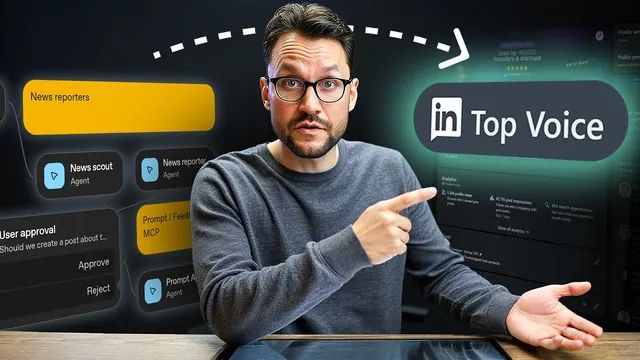
The setup starts in OpenAI’s platform.openai.com using the Agent Builder. A first agent (“new scout”) is configured with web search and tasked with returning a shortlist of relevant headlines based on a user’s topic prompt. A second agent (“news reporter”) then takes that shortlist, selects a strong headline, does deeper research, and produces a news report along with an image suggestion for the post. To keep quality controlled during early testing, the workflow includes a user approval step before anything proceeds.
Drafting the social post is treated as the hardest part. Rather than dumping the research into a generic chat prompt, the workflow emphasizes brand fidelity: the writing must reflect the creator’s tone, values, and style closely enough to feel human. That’s where FeedHive enters. FeedHive is used to generate a comprehensive brand brief by analyzing connected social accounts and a website, then applying a chosen writing style (the example uses a “vertical writing style” suited for LinkedIn). After the brand brief is generated and optionally edited, FeedHive can create drafts that sound like the user.
Automation ties the two systems together. In FeedHive, an “AI news trigger” is created to publish to LinkedIn and Twitter, but initially set to create drafts for review. The workflow then returns to OpenAI’s Agent Builder to connect FeedHive via an MCP server (mcp.feedhive.com). An access token is pulled from FeedHive’s API key settings and added to the MCP configuration so OpenAI agents can call FeedHive tools correctly. After the approval node, a prompt agent uses the MCP tool to pass the selected news report and image into FeedHive, which generates the final draft.
A test run demonstrates the flow end-to-end: the scout agent finds a timely item (including an example about OpenAI making a deal with AMD), the reporter agent selects and researches it, and the prompt agent produces a FeedHive draft. The post appears in FeedHive under drafts with an accompanying image (including an example featuring Sam Altman). From there, the creator can schedule it.
The workflow also suggests a practical interface option: publish the agent workflow and use a tool like Lovable (with OpenAI’s chat kit) to generate a standalone browser chat UI. The takeaway is a modular, approval-gated pipeline that combines real-time news discovery with brand-specific drafting—aimed at making “being first” sustainable rather than exhausting.
Cornell Notes
The system turns social authority into a repeatable pipeline by combining OpenAI Agent Builder with FeedHive. One agent scouts headlines via web search, a second agent picks a headline, researches it, and suggests an image, and an approval step prevents low-quality drafts from moving forward. The hardest part—writing in a distinct personal voice—is handled by FeedHive, which generates a detailed brand brief from connected socials and a website and then drafts posts in a chosen writing style. OpenAI connects to FeedHive through an MCP server (mcp.feedhive.com) using an API token, allowing agents to pass the news report and image to FeedHive for a ready-to-publish draft. This matters because it avoids generic “AI slop” and helps creators consistently post early on major stories.
Why split the workflow into multiple agents instead of asking one model to draft everything at once?
What role does the approval step play in the system?
Why does the transcript warn against using a generic ChatGPT-style prompt to write the social post?
How does FeedHive make drafts sound like a specific creator rather than a generic AI?
How does OpenAI’s Agent Builder connect to FeedHive to generate the final draft?
What does the end-to-end test demonstrate about the pipeline’s output?
Review Questions
- What are the distinct responsibilities of the scout agent and the news reporter agent, and how does web search fit into the first step?
- How does FeedHive’s brand brief generation process reduce the risk of generic, detectable AI writing?
- Where in the OpenAI Agent Builder workflow does the MCP server connection to FeedHive occur, and what inputs does it need to produce a draft?
Key Points
- 1
Use a multi-agent pipeline: one agent scouts headlines, another agent researches and selects a story plus an image, and a user approval step gates quality before drafting.
- 2
Treat brand voice as the hardest problem; avoid generic “dump the research into ChatGPT” drafting that tends to look like AI slop.
- 3
Generate a FeedHive brand brief by connecting social accounts and a website, then choose a writing style that matches the target platform (e.g., vertical style for LinkedIn).
- 4
Create a FeedHive automation trigger (e.g., AI news trigger) that creates drafts first, then publish later after review.
- 5
Connect OpenAI Agent Builder to FeedHive via an MCP server (mcp.feedhive.com) using a FeedHive API key so agents can pass the news report and image for final draft creation.
- 6
Optionally wrap the workflow in a standalone browser chat UI using a tool like Lovable and OpenAI’s chat kit for easier daily use.