Use AI to answer questions in your notes
Based on Reflect Notes's video on YouTube. If you like this content, support the original creators by watching, liking and subscribing to their content.
Clone a pre-built Reflect AI prompt and edit its instructions so it returns an answer instead of repeating the question.
Briefing
A practical way to turn an AI assistant inside Reflect Notes into a “question-and-answer” and “command-execution” tool is to build custom prompts that control both the output format and how much text the assistant is allowed to generate. Instead of selecting a pre-built prompt that merely echoes a question back, the workflow centers on cloning an existing prompt and rewriting its instructions so the assistant returns a clean answer directly into the note.
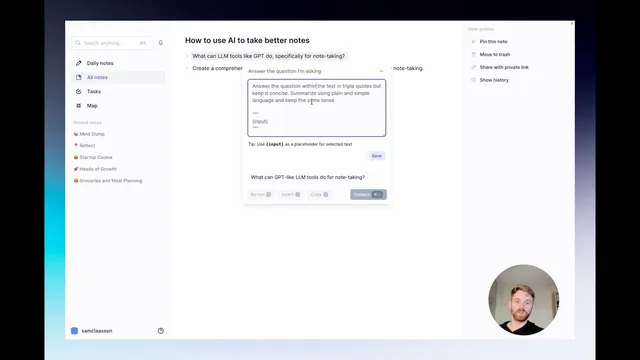
The setup starts with a hypothetical article and a question the user wants answered from within their notes. After selecting the AI assistant, the default behavior can be unhelpful—returning the question rather than answering it. The fix is to choose a prompt template that’s closer to the intended behavior (for example, a “prompted cell” style), then clone it so it can be customized without starting from scratch. The key changes are in the prompt text: the instructions are rewritten to “answer the question” using plain, simple language, while keeping the response concise and constrained to the content the user needs.
To make the output reliable, the prompt is configured with strict formatting rules. The assistant is told to use the input area (shown as triple quotes) as the question or parameters, and to return only the answer—no extra commentary, no surrounding quotation marks, and no fluff. Once saved, running the new prompt produces an actual answer inserted into the note. The user can then iterate by adding parameters such as length control—for instance, requiring “three to five” sentences—then re-running the prompt to see whether the response matches the desired depth. This “tune and rerun” loop is presented as the fastest path to a prompt that fits a specific note-taking style.
A second custom prompt shifts the assistant from answering questions to executing commands. Instead of asking for capabilities in a question form (which would yield a less useful response), the workflow uses a dedicated “execute command” prompt that generates a clean, structured list tailored for insertion into an article or notes. The prompt’s instructions again emphasize output discipline: avoid including the prompt text itself (including the triple-quote wrapper) and return only the requested result. The result is a formatted list that can be dropped directly into writing, supporting tasks like article outlines, research summaries, and reusable note templates.
Overall, the approach treats Reflect’s AI assistant like a ChatGPT-style interface—typing prompts and getting actionable outputs—but with tighter control over what gets returned. With a small set of reusable, cloned prompts, users can repeatedly generate concise answers or ready-to-paste lists on demand, turning notes into a workspace where AI can both respond and produce structured content.
Cornell Notes
Custom prompts in Reflect Notes can turn an AI assistant into a reliable note-taking tool that either answers questions or executes commands. The workflow starts by cloning a pre-built prompt and rewriting its instructions so the assistant returns only the answer, in plain language, without extra quotes or commentary. Output quality improves by iterating on parameters like response length (e.g., three to five sentences). A separate “execute command” prompt produces cleaner, insert-ready lists—useful for article outlines and structured research—by instructing the assistant to return only the requested result and omit prompt text. This makes AI outputs consistent enough to reuse regularly inside notes.
Why does the assistant sometimes just repeat a question instead of answering it, and how is that fixed?
What formatting constraints make the AI output usable inside notes?
How can response length be controlled without rewriting the whole prompt?
Why use an “execute command” prompt instead of asking a question like “what can large language model tools do”?
What does the “execute command” prompt do differently from the Q&A prompt?
Review Questions
- When cloning a prompt, what specific instruction changes ensure the assistant returns an answer rather than echoing the question?
- How would you modify the prompt to require a longer response (e.g., 5–7 sentences) while still preventing extra commentary?
- What output rule would you add to keep the assistant from including prompt text (including triple-quote wrappers) in the final inserted result?
Key Points
- 1
Clone a pre-built Reflect AI prompt and edit its instructions so it returns an answer instead of repeating the question.
- 2
Use strict output constraints like “return only the answer” and “do not wrap responses in quotes” to keep notes clean.
- 3
Control response depth by adding parameters such as “three to five” sentences, then rerun the prompt to compare results.
- 4
Create a separate “execute command” prompt for tasks that need structured, insert-ready outputs like lists.
- 5
In command-style prompts, explicitly prevent the assistant from including prompt text (including triple-quote wrapper content) in the final output.
- 6
Treat prompt iteration as a workflow: adjust wording and parameters, rerun, and keep the version that matches the desired note-taking style.
- 7
Maintain reusable prompts in notes so AI can be called on demand for Q&A and structured writing tasks.