Use the Feynman Technique, Logseq, and Obsidian for Slow Learning
Based on Joshua Duffney's video on YouTube. If you like this content, support the original creators by watching, liking and subscribing to their content.
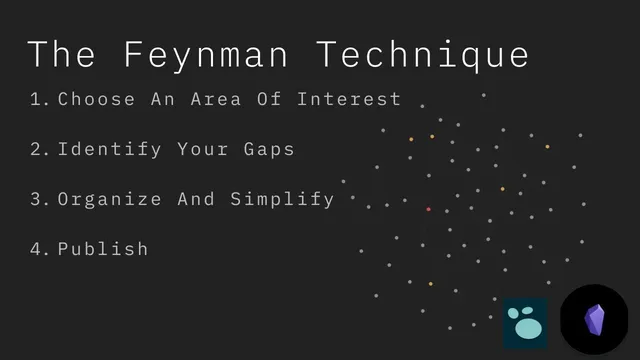
Use the Feynman Technique as a four-step loop: intake, write everything you know to expose gaps, compress and reorganize into teachable cards, then publish for feedback.
Briefing
Slow learning gets a practical workflow: use the Feynman Technique to turn scattered reading into a navigable knowledge base that exposes gaps and drives targeted review. The core loop is four steps—capture what’s known, identify what’s missing, simplify and reorganize into reusable notes, then publish for feedback—so learning doesn’t stall at “consuming content” and instead becomes a system for building understanding.
Step one starts with a focused concept and deliberate intake—books, articles, courses, and videos—often with notes taken along the way. Step two forces clarity by writing down everything the learner thinks they know in a single place (for example, an Obsidian note or a Logseq note). That act of dumping knowledge is where gaps surface: when the writing runs into uncertainty, the learner returns to the original materials to fill holes. Over time, multiple notes emerge at different levels of detail, each reflecting a different slice of the same topic.
Step three is the integration step. Instead of keeping those notes as separate “scraps,” the learner simplifies and reorganizes them into a narrative structure that can teach someone else. In practice, this means extracting key ideas from the scratch notes and compressing them into “knowledge base” cards—often organized by themes using folder structures. The workflow emphasizes building small, reusable nuggets (like a “maps” card for Go) that combine insights from both a book chapter and a related article, then linking them together so the knowledge can be scanned and expanded later.
Step four—publishing—turns private understanding into something testable. Even if full publishing isn’t immediate, the logic is that sharing (with a colleague, online, or via a blog/video) reveals where explanations break down. Feedback then tightens the system, and the cycle repeats either by deepening the same topic or starting a new one.
The transcript then demonstrates how this looks while learning Go. The learner uses Logseq for “literature notes” during consumption: each resource gets a note with a source link at the top, markdown headings copied from the material for structure, and code snippets captured as examples. Daily time-blocking in Logseq adds a recurring metric (at least 30 minutes) to keep the learning investment consistent, and the notes include tags for topics and for “gap” areas—uncertainty that should trigger future study.
Books are handled as chapter-level scratch space with tags and markdown features like bolded key terms, quote blocks for verbatim takeaways, and task lists to track exercises. Courses are mapped to modules and clips using a table-of-contents style structure, with links to tools like the Go Playground and relevant GitHub repositories. The learner also uses “gap” tags to mark weak spots—pointers are highlighted as an example—so the knowledge base becomes a roadmap for selective reading.
When moving into Obsidian, the learner compresses the scratch notes into knowledge cards inside a structured vault (using folder-note organization). Embedded links let the learner “thumb through” the knowledge base like a slip box, and attached code repositories provide executable reference material. The payoff is twofold: faster retrieval when writing or debugging, and more efficient centipical reading—skimming broadly, then analytically reading only the sections that address the learner’s current gaps. The end goal isn’t just better notes; it’s deeper understanding that could eventually support teaching outputs like a course or even a book.
Cornell Notes
The Feynman Technique becomes a concrete note-taking workflow for slow learning: intake (step 1), write everything you think you know to reveal gaps (step 2), then compress and reorganize those scratch notes into reusable knowledge cards (step 3). Publishing (step 4) is the feedback mechanism that tests whether the reorganized notes actually communicate understanding. While learning Go, Logseq serves as a scratchpad for literature notes—source links, markdown headings, code snippets, and “gap” tags—supported by daily time-blocking. Obsidian then turns those scratch notes into an integrated knowledge base using folder structures, embedded links, and attached code samples, enabling targeted review and centipical reading based on identified weaknesses.
Why does writing down “everything you know” (step 2) reliably reveal gaps, and what does that look like in practice?
How does the workflow distinguish between scratch notes and a long-term knowledge base?
What does “simplify and reorganize” mean when learning a programming language like Go?
How do tags and “gap” markers change the learning strategy from passive review to targeted study?
What role does daily time-blocking play in making slow learning sustainable?
Why embed notes and attach code samples inside Obsidian?
Review Questions
- In step 2, what specific behaviors indicate a “gap” in understanding, and how does the workflow respond to that gap?
- How does the transcript’s approach to maps illustrate the difference between a literature note and a knowledge base card?
- What is centipical reading in this context, and how do “gap” tags guide which parts of future resources get read analytically?
Key Points
- 1
Use the Feynman Technique as a four-step loop: intake, write everything you know to expose gaps, compress and reorganize into teachable cards, then publish for feedback.
- 2
Treat Logseq notes as scratch space during consumption: include source links, markdown structure, and code snippets tied to the exact concepts you’re learning.
- 3
Build daily consistency with time-blocking templates that link each day’s entry to the relevant learning note.
- 4
When integrating in Obsidian, extract the most reusable ideas from multiple artifacts into named knowledge cards and organize them with folder structures.
- 5
Use tags—especially “gap” tags—to turn your knowledge base into a study plan that drives centipical reading and targeted review.
- 6
Embed linked notes and attach executable code samples so the knowledge base supports both understanding and implementation.
- 7
Don’t take notes for everything; reserve the heavier step-3 integration work for material that you need to understand deeply or reuse later.