Visual Zettelkasten
Based on Zsolt's Visual Personal Knowledge Management's video on YouTube. If you like this content, support the original creators by watching, liking and subscribing to their content.
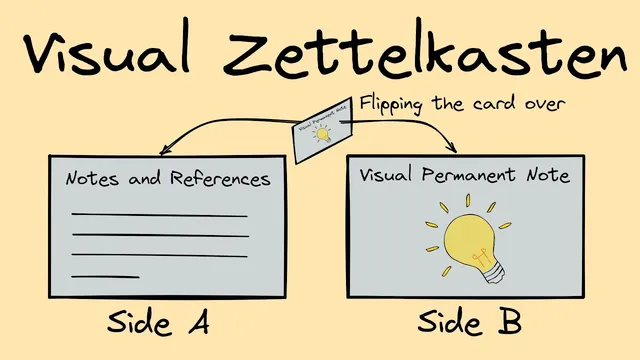
Visual Zettelkasten treats an Excalidraw sketch as the atomic permanent note, eliminating the need to create a separate permanent note for the same idea.
Briefing
“Visual Zettelkasten” reframes Zettelkasten-style permanent notes by treating the visual sketch itself as the permanent note—so the illustration and the idea card live in the same file. The payoff is cleaner linking and fewer “bridges” between an image and the text that interprets it, which often makes idea connections harder to navigate.
Traditional Zettelkasten relies on creating separate atomic notes (“permanent notes”) and linking them together. In practice, that can feel like extra workflow steps for non-academic note-takers who already capture insights through sketches, diagrams, and simple visuals. The approach here starts from a common habit: when reading or taking notes, create quick visual representations to understand and retain concepts. The key shift is to stop treating those visuals as attachments that later need a separate permanent note; instead, the drawing becomes the atomic unit.
The method uses Excalidraw inside Obsidian, where drawings are stored as markdown documents with two synchronized views: an Excalidraw canvas view and a markdown view. Switching to the markdown side allows the user to add Zettelkasten-style metadata, links, and references directly “on the back” of the note card. In other words, the system flips the library card: one side is the visual (the front), and the other side is the permanent-note content (the back). Excalidraw’s markdown structure preserves a “front matter” section and a “text elements” section, leaving a flexible middle area where the permanent-note template and links can be placed.
Examples show the practical difference. In an earlier workflow, a permanent note would reference an image, meaning navigation and idea connections depended on a separate image-to-note relationship. That extra indirection can hinder how smoothly ideas connect. With the new approach, the drawing file is the permanent note itself. When the “double bubble map” drawing is opened, the permanent-note content and the visual are already unified, and child links point directly to related items in the vault. The result is a more direct “idea-to-graph” structure: the visual is not just evidence for a thought—it is the thought’s node.
Two technical behaviors stand out. First, embedding references can create recursion, but Excalidraw/image handling prevents an endless loop; Obsidian stops recursion after a few levels. Second, the unified file enables a reusable “idea section” that can be embedded elsewhere, along with the visual, without maintaining separate attachments. Finally, a newer Excalidraw/Obsidian integration feature supports multiple tags on a drawing and lets users define a primary “note type” field that controls how Excalidraw vs permanent-note styling appears in Excalidraw/Obsidian views.
The broader message is that visual thinking can be operationalized as an atomic knowledge system: sketches become permanent, linkable nodes. The creator also promotes a “Visual Thinking Workshop” (November 4 to December 9) aimed at strengthening summarization, problem-solving, and big-picture thinking through visual processing, including access to a demo Obsidian vault and office hours.
Cornell Notes
“Visual Zettelkasten” turns Excalidraw sketches into the actual atomic permanent notes, rather than keeping drawings as separate attachments. Because Excalidraw drawings are stored as markdown documents, the markdown “back side” can hold Zettelkasten-style front matter, templates, links, and references while the Excalidraw canvas provides the visual “front.” This removes the extra navigation step of linking a permanent note to an image, making idea connections cleaner. Examples like “myelination” and “eight thinking maps” show how child links and reusable idea sections work when the drawing and permanent note are one file. Newer Excalidraw/Obsidian features also allow defining a primary note type tag to control styling and document classification.
What problem does “Visual Zettelkasten” try to solve compared with a more traditional slip-box workflow?
How does Excalidraw inside Obsidian make it possible for a drawing to function as a permanent note?
What changes in linking and navigation when the drawing is the permanent note rather than an attachment?
Why does embedding a drawing inside its own note risk recursion, and what prevents it from going on indefinitely?
How does the “idea section” enable reuse of summaries across the vault?
What does the “note type” feature add to Excalidraw/Obsidian document handling?
Review Questions
- In Visual Zettelkasten, what specific markdown region is used to place the permanent-note template, and why doesn’t it overwrite Excalidraw’s front matter or text elements?
- Compare the navigation/linking structure of a permanent note that references a separate image versus a drawing that is itself the permanent note. What “bridge” is removed?
- How does defining a primary “note type” tag change the way a drawing/permanent note is presented in Excalidraw/Obsidian views?
Key Points
- 1
Visual Zettelkasten treats an Excalidraw sketch as the atomic permanent note, eliminating the need to create a separate permanent note for the same idea.
- 2
Excalidraw drawings in Obsidian are markdown documents with two views, enabling a “front (drawing) / back (permanent-note content)” workflow.
- 3
The permanent-note template and links can be placed in the editable markdown region between front matter and text elements, while Excalidraw preserves the rest.
- 4
Unifying the drawing and permanent note removes an extra image-to-note navigation bridge, making idea connections cleaner and easier to follow.
- 5
Embedding can create recursion when a note references an image that references back; Obsidian halts recursion after a limited depth.
- 6
A newer Excalidraw/Obsidian feature lets users tag drawings with multiple types and designate a primary “note type” to control styling and document classification.
- 7
A “Visual Thinking Workshop” runs November 4 to December 9 and includes sessions, office hours, and a demo Obsidian vault for practicing visual summarization and problem-solving.