VoiceNotes AI: The Best Way to Capture Fleeting Notes in Obsidian
Based on Prakash Joshi Pax's video on YouTube. If you like this content, support the original creators by watching, liking and subscribing to their content.
VoiceNotes AI is built for quick voice capture, producing AI transcripts and immediate “actions” like summaries and to-do lists.
Briefing
VoiceNotes AI is a voice-to-text app built for fast capture: record a thought, have AI generate a transcript, and then turn that transcript into summaries, to-dos, posts, or other outputs—without forcing users to write everything down manually. The core workflow is simple and designed for “fleeting notes,” with recordings uploaded for transcription and an immediate AI summary option that can compress raw ideas into something usable.
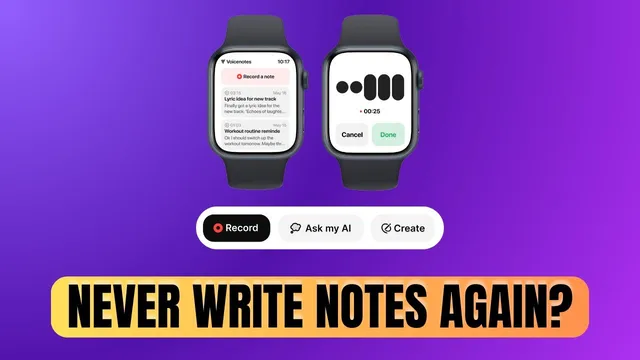
Availability is broad for a new tool. VoiceNotes runs on Android, iOS, and as a web app, with a roadmap prioritizing a Smartwatch app next. The creator also highlights an “offline” item on the roadmap, but notes that current transcription requires being online. A key practical detail: the web version can be used without signing up, letting people test transcription quality quickly in an incognito session.
The app’s standout features go beyond transcription. Users can generate AI actions from a recording or transcript—creating a summary, a to-do list, a blog post, a tweet, or even an email draft. There’s also transcript editing when the AI gets something wrong, plus tagging and sharing. Sharing supports both copying the note text and generating a link that lets others view the note and listen to the recording in a private browsing session.
VoiceNotes also supports customization and deeper retrieval. Users can add custom instructions or prompts alongside AI actions, and an “Ask My AI” mode is positioned as a searchable memory across all stored voice notes and journal entries. The app supports over 50 languages for transcription, and it offers AI “accents” both per note and across recordings.
Pricing is structured around a free recording limit and paid upgrades. Recording is free up to 1 minute per note; longer notes require a Premium plan at $10 per month. A “Believer” plan offers lifetime access for $50 and includes “limitless recording” and access to “smarter AI models.” The transcript-to-action features are framed as time-savers that add clarity after the fact.
For Obsidian users, VoiceNotes is paired with an unofficial community plugin that syncs recordings into an Obsidian folder. Setup involves installing the plugin, logging into a VoiceNotes account, setting sync frequency and a sync directory, and optionally applying a tag to mark which notes need processing. Manual sync creates a “recordings” folder and links related notes back to VoiceNotes. The walkthrough also flags a potential bug with tag handling in the plugin, while a recent plugin update adds features like treating “todo creation” as actual to-dos and appending tags at the end of the to-do.
Overall, VoiceNotes is positioned as a capture-first system for quick voice journaling, meeting notes (with a caveat about note length), and idea dumping—then using AI to transform messy audio into structured writing inside both the app and Obsidian.
Cornell Notes
VoiceNotes AI turns spoken thoughts into AI-generated transcripts and then into usable outputs like summaries, to-do lists, tweets, blog posts, and email drafts. It’s available on Android, iOS, and the web, with a Smartwatch app planned next; transcription currently requires an internet connection. The free tier records up to 1 minute per note, while Premium ($10/month) and a lifetime “Believer” plan ($50) unlock longer recording and more advanced AI models. For Obsidian users, an unofficial community plugin syncs VoiceNotes recordings into an Obsidian folder, with configurable sync frequency, directories, and tagging. An “Ask My AI” feature lets users query across their stored voice notes and journal entries.
What is the fastest “capture-to-output” workflow in VoiceNotes AI?
How does VoiceNotes handle availability and testing without committing to an account?
What are the main pricing limits and what do upgrades change?
What kinds of post-processing and sharing features exist beyond transcription?
How does VoiceNotes integrate with Obsidian, and what does syncing actually do?
What does “Ask My AI” mean in practice for organizing journal content?
Review Questions
- What specific AI actions can be generated from a VoiceNotes transcript, and how do they differ from plain transcription?
- How do free and paid plans differ in recording length, and what is the cost of the lifetime “Believer” plan?
- Describe the key steps needed to sync VoiceNotes recordings into Obsidian using the community plugin.
Key Points
- 1
VoiceNotes AI is built for quick voice capture, producing AI transcripts and immediate “actions” like summaries and to-do lists.
- 2
The app is available on Android, iOS, and the web, with Smartwatch support and offline transcription listed on the roadmap.
- 3
Transcription currently requires being online, but the web version can be tested without signing up via incognito.
- 4
Free recording is limited to 1 minute per note; Premium costs $10/month and a lifetime “Believer” plan costs $50.
- 5
VoiceNotes supports transcript editing, tagging, and sharing via copy or a link that lets others view and listen.
- 6
AI customization includes custom prompts/instructions and AI accents, and transcription supports over 50 languages.
- 7
Obsidian integration uses an unofficial sync plugin that logs into VoiceNotes, syncs recordings into a chosen folder, and can append tags/todos based on recent plugin updates.