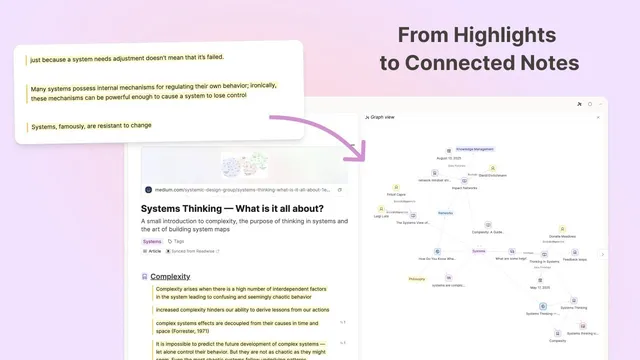
What to Do After Reading: A Sustainable Note-Processing Workflow
Based on Capacities's video on YouTube. If you like this content, support the original creators by watching, liking and subscribing to their content.
Start with intentional triage: group related highlights under headings, add short reminders if needed, and delete low-value highlights while keeping the Readwise archive intact.
Briefing
A sustainable workflow for turning Readwise highlights into connected knowledge in Capacities hinges on one principle: intentionality. Instead of treating highlights as a passive archive or running every action on every quote, the process starts with a quick, purposeful cleanup—grouping the most relevant passages, deleting the rest, and optionally editing or nesting related highlights—so the remaining notes immediately reflect what matters to the reader.
From there, the workflow shifts from organization to connection. Highlights are treated as raw material that should be linked to the rest of a knowledge system. The reader first rearranges highlights into themed sections (for example, “complexity,” “systems thinking,” and “mapping systems”), adds headings, and uses indentation to group sub-points under a core highlight. Notes can be attached directly to highlights as reminders for future review, and an AI assistant can be used to answer questions about ambiguous references—then appended to the highlight in a way that stays readable later. Color coding and link toggles help control what stays visible, while deletion remains encouraged because Readwise remains the source of record; Capacities is simply the working context.
The next step is more strategic: linking what the highlights remind the reader of. The reader tags the article with broader concepts (such as adding a “systems” tag) and creates missing definitions when needed. When “complexity” lacks a definition, a new object is created, and the highlight blocks discussing complexity are linked to it—so the definition automatically gains useful context. For “systems thinking,” the reader searches for an existing definition, creates one if absent, and then links the most fitting highlight(s) and even supporting media (like an image) into that definition. Some highlights are moved, renamed, or deleted after their value is reassessed, reinforcing that the system is meant to evolve.
As connections accumulate, the workflow introduces a feedback loop: reviewing back links and mentions to refine what the definitions mean. The reader summarizes what the linked highlights collectively teach about “complexity,” then updates the definition by examining both back links (explicitly linked content) and mentions (where the term appears without a link). This often reveals that the highlights teach not only about complexity, but also about how systems thinking helps manage it—prompting the reader to link definitions to definitions rather than forcing every highlight into the same bucket. The result is a clearer conceptual map, visible in graph view, where “complexity” and “systems thinking” become explicitly connected.
The workflow also supports escalation. If a quote is especially memorable, it can be converted into an object so it appears across the system, can be tagged, and can be reviewed alongside similar items. And when the linking process sparks curiosity, the integration can import additional highlights from Readwise via a command palette—turning the system into a controlled path into related reading.
Overall, the approach rejects a one-size-fits-all checklist. It’s designed to be sustainable: do what’s useful now, revisit definitions when you’re ready, and rely on back links and mentions to make future review efficient. The payoff is a living network of notes that turns scattered highlights into connected knowledge over time.
Cornell Notes
The workflow turns Readwise highlights into connected notes in Capacities by treating highlights as editable building blocks rather than a static archive. It begins with intentional cleanup: group related highlights under headings, delete what won’t be used, and optionally add reminders or AI-assisted clarifications. Next, it links highlights to the concepts they support—creating definitions (e.g., for “complexity” or “systems thinking”) and attaching supporting assets like images. Finally, it refines those definitions by reviewing back links and mentions to see what the linked material collectively teaches, often leading to definition-to-definition connections. This matters because it converts isolated quotes into a navigable knowledge graph that improves as more reading and linking accumulate.
Why does the workflow start with rearranging and deleting highlights instead of immediately linking everything?
How does Capacities help turn a highlight into a reusable piece of knowledge?
What’s the difference between back links and mentions, and why does it matter for refining definitions?
Why does the workflow sometimes link definitions to definitions instead of highlights to definitions?
What role do AI Q&A and notes attached to highlights play in the workflow?
When should a highlight be converted into an object?
Review Questions
- How would you decide which highlights to delete versus keep when setting up a new article in Capacities?
- Describe a concrete example of how you would create a definition object and use back links and mentions to refine it.
- What situations would make you link a highlight to a definition versus linking one definition to another?
Key Points
- 1
Start with intentional triage: group related highlights under headings, add short reminders if needed, and delete low-value highlights while keeping the Readwise archive intact.
- 2
Use indentation and headings to preserve the structure of ideas so future review happens by concept, not by isolated quotes.
- 3
Link highlights to the concepts they support; create missing definition objects when you realize you lack a working definition (e.g., for “complexity”).
- 4
Refine definitions by reviewing both back links (explicit links) and mentions (unlinked references) to capture what the highlights collectively teach.
- 5
Promote standout highlights into objects when you want them to be searchable, taggable, and reviewable across the whole system.
- 6
Let linking reveal relationships; when the learning is actually about a mechanism or framework, link definitions to definitions for precision.
- 7
Keep the workflow sustainable: treat it as a menu, not a checklist—do deeper linking when it’s meaningful, and revisit later when you’re ready.