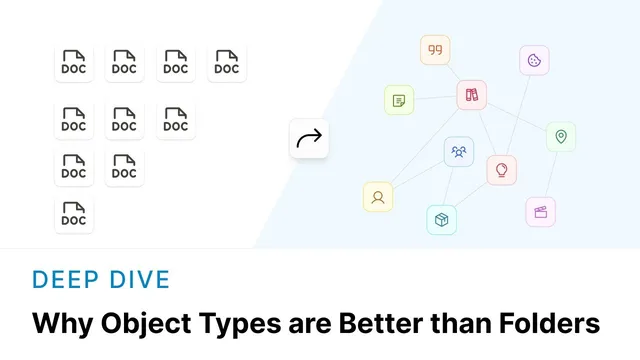
Why Object Types are Better than Folders
Based on Capacities's video on YouTube. If you like this content, support the original creators by watching, liking and subscribing to their content.
Folders demand a placement decision for every new note, and those decisions compound into friction as the system grows.
Briefing
Folders and files create a steady stream of small decisions that add up to real friction: every new note forces a choice about where it belongs, and that choice has to be remembered later. Over time, the folder system’s “flexibility” turns into rigidity—each file can only live in one place—so cross-context reuse becomes awkward. When people can’t find what they need where they expect it, they lean on search more often, which makes the earlier effort of building the structure feel wasted. The core problem isn’t that categorizing information is useless; it’s that folder-based organization rarely scales as note volume grows, because it keeps demanding attention from the work the notes were meant to support.
Capacities takes a different approach centered on object types, links, tags, and a central calendar. Instead of starting with blank documents that can be anything, every note in Capacities is an object with a predefined type—such as Person, Quote, Meeting Note, or Idea. Those types aren’t just labels. Each type comes with its own properties and layout, so the structure of the note is decided up front and applied automatically. That shifts daily effort away from “where should this go?” toward “what kind of note am I creating?” The sidebar becomes a list of the types actually used, and type settings can include templates, calendar-related configuration, and page layouts. Even better, types can be changed later: converting an Idea into a Project reshapes the existing content into a new context without losing what was already captured.
This object-type system also addresses a major folder weakness: reuse across multiple contexts. Folders force a single physical location, but Capacities lets content stay useful wherever it’s relevant through links. A web link about Instagram’s changing dimensions can be attached to a social media project so it’s immediately available in that context; when the link is opened later, back-links show where it was used. The same idea extends to images and definitions, where linked context can be resurfaced without hunting through a rigid hierarchy.
Tags provide another flexible grouping mechanism that doesn’t require exclusive placement. A Knowledge Management tag can collect any content the user chooses, while the same item can also carry tags like Ideas, Research, or character-related categories. Views can then collate and filter tagged items, giving a more adaptable “at a glance” map than folders—especially when the same note belongs to multiple threads.
Finally, a central calendar anchors objects in time. Objects created on a given day appear in a daily view, and date ranges help show what’s active. The result is multiple paths back to information—by type, by link, by tag, and by time—without the upfront organizational overhead that folders demand. The overall promise is reduced mental load: fewer decisions about structure, more attention on capturing, connecting, and progressing work.
Cornell Notes
Capacities replaces folder-first organization with object types. Every note is created as a typed object (e.g., Person, Quote, Meeting Note), and each type defines properties and layout so users spend less time deciding where content should live. Notes can be reshaped later—turning an Idea into a Project keeps prior work while adding the structure needed for the new context. Instead of forcing one physical location, Capacities uses links and back-links to keep resources available in multiple contexts. Tags and a central calendar add flexible ways to resurface information by keyword grouping and by time, reducing reliance on search and cutting decision fatigue.
Why do folders create more friction than they seem to at first?
How do object types reduce decision-making in Capacities?
What happens when an Idea needs to become a Project?
How does linking solve the “one location” limitation of folders?
How do tags differ from folders as a way to group information?
What role does the central calendar play in retrieving notes?
Review Questions
- How does changing an object’s type in Capacities differ from moving a file between folders?
- Give one example of how links and back-links preserve context better than a folder hierarchy.
- What are the two daily decisions Capacities aims to reduce, and how do type, tags, and the calendar support that?
Key Points
- 1
Folders demand a placement decision for every new note, and those decisions compound into friction as the system grows.
- 2
Folder hierarchies scale poorly because each item must live in one place, making cross-context reuse harder and pushing users toward search.
- 3
Capacities assigns a type to every object, and type settings define properties, templates, and layouts to reduce daily organizational decisions.
- 4
Object types can be reshaped over time (e.g., converting an Idea into a Project) without losing the work already captured.
- 5
Links and back-links replace rigid physical placement by keeping resources available in multiple contexts while preserving where they were used.
- 6
Tags provide flexible, non-exclusive grouping so the same content can appear in multiple views (e.g., Knowledge Management and Research).
- 7
A central calendar adds time-based retrieval, listing objects by creation day and supporting date ranges for ongoing work.