Getting Things Done: Microsoft OneNote Second Brain
Based on Duddhawork's video on YouTube. If you like this content, support the original creators by watching, liking and subscribing to their content.
Use Microsoft OneNote as a low-friction capture hub with a default destination in “Quick Notes,” so ideas are recorded immediately and synced across devices.
Briefing
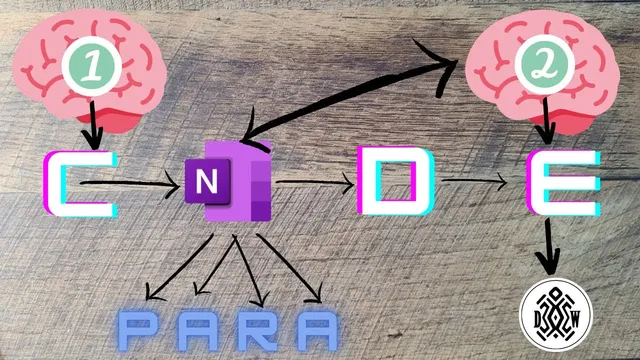
A practical “second brain” setup using Microsoft OneNote turns David Allen’s Getting Things Done (GTD) idea—capturing thoughts outside the mind—into a working workflow that also supports Thiago Forte’s “CODE” method (Collect, Organize, Distill, Express). The core finding is that the app choice matters less than having a low-friction capture system that syncs instantly, then routing notes into the right buckets so they become actionable later rather than dead-ended scraps.
The workflow starts with capture. Using Microsoft OneNote, the creator sets OneNote’s default destination to a “Quick Notes” area inside a GTD structure. On a Surface Pro, handwritten notes and pen input are captured directly, while a phone-based OneNote badge enables quick additions: thoughts can be typed, and images can be snapped and automatically scanned. Notes are confirmed as they appear on the desktop and sync across platforms. The key behavior is intentionally low effort: whenever something might be useful later, it gets written down immediately; if it turns out not to matter, it can be deleted or archived. Over time, the system builds intuition about what deserves detail, because the capture step stays fast and forgiving.
Next comes organization, where the collected material is sorted into categories aligned with Forte’s framework: projects, project areas, resources, and archives. “Projects” hold active work—such as drafting an article from podcast notes—while “resources” store supporting material and “archives” preserve completed or inactive items. The creator also uses Microsoft To Do as the task execution layer, treating OneNote more like a capture and reference hub than a daily task manager. Examples include planning weekly reviews on Sundays, storing podcast highlights, brainstorming content ideas for a newsletter over time, and tracking research tasks related to Bayesian statistics and experimental design concerns.
Distillation reduces friction after capture. Raw notes can be messy, but the system’s purpose is to extract takeaways that can become publishable outputs. The creator describes distilling notes into usable conclusions—turning rough material into the “what matters” needed for an article or other deliverables.
Finally, “Express” closes the loop by turning distilled information into action and sharing. Blog posts, shared Notion pages, and Readwise quote sharing are treated as the end goal: notes aren’t just stored, they’re used to create. The creator also offers a pragmatic warning: starting with an overly complex GTD template can lead to unused features. A minimalist setup—like a single gift list or grocery list that grows over time—can build the same system gradually, using whatever tools fit the user’s habits. The takeaway is a workflow that offloads memory, organizes work, and reliably converts captured ideas into real outputs.
Cornell Notes
The workflow combines GTD’s central principle—offloading ideas from the brain—with Thiago Forte’s CODE method to make notes actionable. Microsoft OneNote serves as a fast capture layer using synced “Quick Notes,” including pen input and phone-based scanning so ideas can be captured in seconds. Notes then get organized into Projects, Project Areas, Resources, and Archives, with Microsoft To Do used for task execution rather than daily note-taking. Distillation turns messy raw notes into takeaways suitable for writing, and “Express” converts those takeaways into outputs like blog articles, shared pages, and quote sharing. The system matters because it reduces friction at capture while ensuring information eventually becomes work or publishing.
Why does the system emphasize capturing everything quickly instead of deciding usefulness immediately?
How does organization turn scattered notes into a structure that supports action?
What does “distill” mean in this workflow, and why is it separated from capture?
What does “express” look like when notes are meant to produce real outcomes?
What’s the practical advice for someone overwhelmed by GTD templates and tool sprawl?
Review Questions
- How does the workflow handle the tradeoff between fast capture and deciding what’s useful?
- Describe the roles of OneNote versus Microsoft To Do in this system.
- What steps connect raw notes to a publishable blog article in the CODE framework?
Key Points
- 1
Use Microsoft OneNote as a low-friction capture hub with a default destination in “Quick Notes,” so ideas are recorded immediately and synced across devices.
- 2
Rely on quick capture features—pen input on Surface Pro and phone-based scanning—so collecting information takes seconds, not minutes.
- 3
Organize notes into Projects, Project Areas, Resources, and Archives to separate active work from reference material and completed items.
- 4
Use Microsoft To Do for task execution rather than trying to manage daily action inside OneNote.
- 5
Distill messy raw notes into takeaways after organizing, focusing on what will actually be used for writing or other outputs.
- 6
Close the loop with “Express” by turning distilled information into actions like blog posts, shared pages, or quote sharing.
- 7
Start with a minimalist setup and add complexity gradually; importing a full template can create unused clutter.