How I Organise My PhD Research Project Notes in Notion - Thesis Planning Notion Template
Based on Ciara Feely's video on YouTube. If you like this content, support the original creators by watching, liking and subscribing to their content.
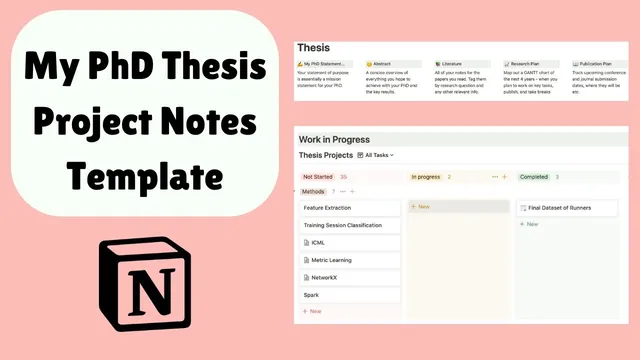
Build a thesis dashboard in Notion with dedicated areas for purpose/statement, literature tracking, a research plan (Gantt chart), and upcoming publication ideas.
Briefing
A structured Notion system is helping a PhD student keep thesis writing from turning into a scavenger hunt: project notes are organized by chapter-level workstreams, then dragged through a “not started → in progress → done” workflow so every decision, dataset step, and meeting takeaway stays attached to the right research question. The payoff is practical—when it’s time to write, the notes for each project are already packaged for that chapter, reducing the need to rebuild context from scratch.
The setup begins with a thesis dashboard that acts like a roadmap. It includes a “PhD statement on purpose” area with guidelines for writing and an abstract-writing reference, a “literature” section designed to track literature notes, a “research plan” area built to create a Gantt chart for the PhD timeline, and an “upcoming publications” space to log ideas and targets. A global inbox captures stray ideas anywhere in the system, which can later be sorted into the correct place. There’s also a “research diary” for thesis notes and meeting notes, plus a projects area that functions as the hub for chapter-linked work.
Projects move through clear status lanes. When starting something new, the project is moved from “not started projects” into “in progress,” and once finished it’s dragged into “done.” The student emphasizes that this approach matters because thesis writing depends not only on the final paper content, but on the full trail of what was tried, decided, and learned. Earlier in the PhD, notes were managed differently (paper planning and iPad planning), leaving roughly a year and a half without the same level of captured detail—an omission the system is meant to prevent going forward.
Inside each project folder, the notes follow a repeatable structure. Early sections typically include motivation (why the project matters), methods (including data cleaning and dataset summaries), and then sections aligned to individual research questions. For supervisor meetings, the system is used to present organized, readable summaries, often alongside computational artifacts like Jupyter notebooks—while avoiding the fragility of notebooks where reruns can disrupt plots. The student also adds project-specific literature directly into the project folder when new questions emerge, then later merges those findings back into the general literature review.
A concrete example focuses on “training break summarization” in marathon training plans, examining whether training disruptions affect marathon performance. One methodological concern is selection bias: analyzing only runners who finish the marathon can exclude people who dropped out due to training disruptions from time constraints or injury. To address this, the student looks for studies estimating dropout proportions—an issue that didn’t surface during broad literature searching but becomes central once the project narrows.
For a second project view—geared toward paper writing—the folder includes the same core components (motivation, data, methods, evaluation) plus a “paper plan” section. That plan uses bullet points and checkboxes to track what goes into each paper section and to manage last-stage graph fixes. The overall result is faster writing because the system provides ready-to-use outlines and meeting-ready notes, rather than forcing the student to start from zero when assembling a manuscript for publication.
Cornell Notes
The core idea is to organize PhD work in Notion by packaging every project’s notes—motivation, methods, datasets, literature, results, and supervisor meeting takeaways—into chapter-linked project folders. Projects move through a workflow (“not started” → “in progress” → “done”), so thesis writing later starts from organized context instead of rebuilding history. Each project folder uses a consistent structure: motivation, data/methods, research-question sections, and then paper-oriented planning with bullet points and checkbox lists for graph and section completion. The system also supports selection-bias questions by prompting project-specific literature searches when new constraints appear. The practical benefit is quicker paper drafting and smoother supervisor presentations.
How does the Notion setup prevent thesis writing from becoming a “start from scratch” problem?
What role does the “not started → in progress → done” workflow play?
Why does the system keep project-specific literature inside project folders, not only in a global literature database?
What selection-bias issue arises in the marathon training-break example, and how is it handled?
How does the system help during supervisor meetings and paper drafting when computational notebooks can be messy?
What does the “paper plan” section do differently from the research notes sections?
Review Questions
- How does moving projects through status lanes change what you can find later when drafting a thesis chapter?
- In what situations would you add literature notes directly to a project folder rather than waiting for the general literature review?
- What kinds of last-stage tasks (e.g., graph fixes) benefit from checkbox-style tracking in a paper plan?
Key Points
- 1
Build a thesis dashboard in Notion with dedicated areas for purpose/statement, literature tracking, a research plan (Gantt chart), and upcoming publication ideas.
- 2
Use a global inbox and a research diary to capture ideas and meeting notes quickly, then route them into the correct project later.
- 3
Organize thesis work as project folders that move through a clear workflow: not started → in progress → done.
- 4
Inside each project folder, keep motivation, methods/data cleaning, dataset summaries, research-question sections, and supervisor-ready notes together.
- 5
Add project-specific literature when new constraints or sub-questions emerge, then merge those notes into the general literature review afterward.
- 6
For writing, include a paper plan section with bullet-point outlines and checkbox lists to manage graph fixes and section completion.
- 7
Store the full decision trail (not just final paper content) so thesis drafting starts from organized context rather than reconstruction.