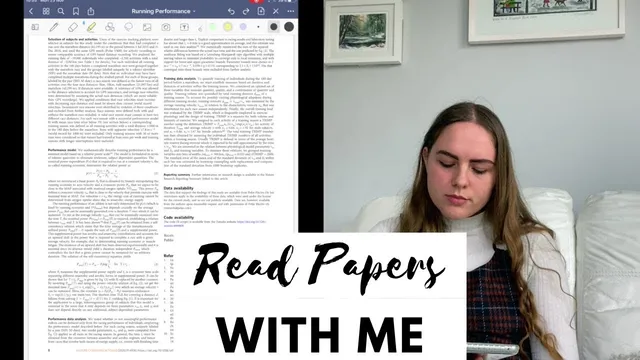
How I Read Scientific Papers on my iPad | Read Academic Papers with me
Based on Ciara Feely's video on YouTube. If you like this content, support the original creators by watching, liking and subscribing to their content.
Use a consistent annotation workflow: highlight the full abstract, then add brief handwritten margin notes to preserve questions and context for later rereads.
Briefing
Reading academic papers on an iPad can be more than a convenience—it can become a repeatable workflow for tracking key ideas, capturing margin-level questions, and deciding what to revisit later. The core approach here is to treat the PDF like a working document: highlight the abstract, add handwritten notes directly in the margins, and then follow a deliberate reading order (abstract → introduction/related work → results → methods/discussion as needed), so the paper remains usable long after the first pass.
The setup is practical and purpose-driven. A standard 10.2-inch iPad is used mainly for note-taking, planning, and reading—analysis work stays off the device. An Apple Pencil supports handwriting-style highlighting and annotations, and a paper-textured screen protector (Paperlike) is chosen specifically to make writing feel closer to pen-on-paper, even though it reduces screen sharpness compared with a bare display. An Otterbox case with a pencil grip provides drop protection and makes the iPad easy to carry around.
The reading workflow starts with creating a dedicated notebook entry inside GoodNotes and linking it to the PDF so notes can live “inside” the paper. The abstract gets fully highlighted in yellow, reflecting a rule of thumb: the abstract is dense enough that skipping it would cost context later. Next, brief margin notes are added while reading—questions, interpretations, and reminders—so returning to the PDF later instantly restores the original thought process.
From there, the order adapts to the paper’s structure. When a paper lacks a conventional conclusion, the reader shifts to the introduction and related work, treating that section as a map of nearby literature. Related work is handled with selective grouping: references tied to specific claims or sentences are highlighted, then organized at the end of the paper with short notes about what each reference supports. As the reader encounters highly relevant prior work, those papers get added to a “to read” list for future follow-up.
Once results and discussion begin, the reading strategy becomes more diagnostic. If the results feel unclear, the reader jumps into the methods embedded within the discussion to understand how performance and prediction time are calculated. This paper’s layout is described as unusual—moving between introduction/related work, results that include methods, a separate methods section, and a discussion section that contains additional methods—so the workflow involves flipping back and forth until the implementation details click.
The process ends with a realistic assessment of effort. The reader spends about an hour on the first pass, but expects multiple rereads because the goal is not just comprehension—it’s replication. Code is checked for feasibility, but rusty programming skills mean the code can’t be fully digested in one sitting. The payoff is that the annotated PDF becomes a reusable reference: when the reader returns, the highlights and margin notes reduce the need to “relearn” the paper from scratch. Overall, the iPad’s mobility also supports comfort—reading while lying down or moving around is easier than staying fixed at a desk, making longer study sessions more sustainable.
Cornell Notes
The workflow centers on turning a PDF into an annotated study document on an iPad. The reader highlights the entire abstract, then adds handwritten margin notes in GoodNotes so key questions and reminders are preserved for later rereading. For literature-heavy sections, related work references are grouped and tagged with short notes about what each citation supports, and promising papers are added to a “to read” list. When results are confusing, the reader switches to methods embedded in the discussion to understand how performance and prediction time are computed, then returns to results. Replication-level papers require multiple passes, and code availability is checked early even if it can’t be fully understood on the first read.
Why highlight the entire abstract, and how does that choice affect later study?
How are margin notes used differently from digital highlighting?
What strategy is used for the introduction/related work section?
What triggers switching from results to methods/discussion?
How does the reading plan change when the goal is replication rather than quick comprehension?
Why does the reader prefer an iPad setup with a textured screen protector?
Review Questions
- What specific steps are taken before reading the main body of a paper (and why)?
- How does the reader decide whether to read results first or jump to methods/discussion?
- What evidence in the workflow suggests the paper is being prepared for replication rather than summarization?
Key Points
- 1
Use a consistent annotation workflow: highlight the full abstract, then add brief handwritten margin notes to preserve questions and context for later rereads.
- 2
Keep notes linked to the PDF in GoodNotes so annotations remain attached to the exact sections they refer to.
- 3
Treat related work as a structured map by grouping citations tied to specific claims and tagging what each reference supports.
- 4
When results feel unclear, switch to the methods embedded in the discussion to understand implementation details, then return to results.
- 5
Check code availability early for replication feasibility, even if it can’t be fully understood on the first pass.
- 6
Expect replication-focused papers to require multiple rereads, especially for performance and prediction-time calculations.
- 7
Choose an iPad setup that matches the task: prioritize comfort and handwriting feel (e.g., Apple Pencil plus a textured screen protector) over raw screen sharpness.