How to Stop Wasting Your Time
Based on Mariana Vieira's video on YouTube. If you like this content, support the original creators by watching, liking and subscribing to their content.
Schedule the hardest, highest-leverage work at the start of your peak productivity window, not by default at the first morning block.
Briefing
Time blocking works best when it’s tuned to a person’s actual energy patterns and paired with tighter execution tools—so the day stops being a list of intentions and becomes a sequence of achievable next steps. Instead of planning every hour in a generic way, the approach calls for assigning the hardest, highest-leverage work to the moments when focus is naturally strongest. That shift matters because most people lose efficiency not from a lack of effort, but from mismatching tasks to the wrong time and underusing breaks.
A key adjustment is “eat the frog,” but not at the literal first block of the morning. Scheduling dreaded work at 7 a.m. can backfire if the person is still groggy. The recommendation is to place the “frog” at the beginning of the day’s peak productivity window—whether that’s late afternoon, around 11 a.m., or another consistent high-focus period. The goal is to use the body’s rhythm as the scheduling rule, not habit or tradition.
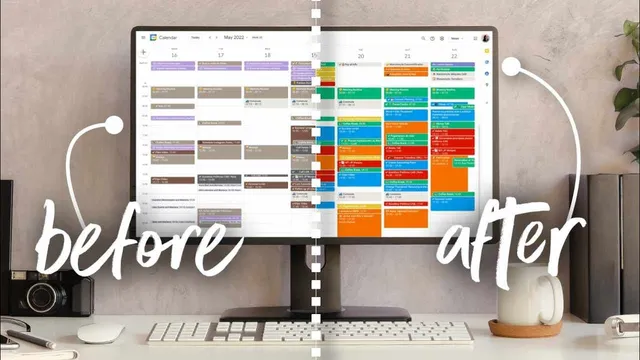
The method also leans on templates and repetition. Recurring tasks—like publishing posts, following up with coaching clients, coordinating monthly content planning, or running business and financial reviews—should be scheduled in advance so they don’t rely on memory or last-minute motivation. Recurrence turns calendar management into a predictable system: morning and evening routines, lunch breaks, and commute times can be pre-structured, while weekly or monthly workflows can be placed into specific time windows that match the energy required for each task.
To make time blocking more actionable, the transcript distinguishes it from time boxing. Time blocking might set a broad research window (for example, 3–4 p.m.). Time boxing adds specificity and ambition: research three books and produce an outline by 4 p.m. That extra constraint creates a clearer “next step,” helps prevent tasks from expanding indefinitely, and leaves the remaining time for either an extended break or the next scheduled activity.
Checklists are presented as another execution layer. Rather than dumping tasks into a paper list and only checking them off later, tasks can be entered directly into a calendar (such as Google Calendar) as events or to-dos. A practical workflow is to schedule these items a week ahead, then update the task label with a checkmark emoji when completed—creating an integrated to-do list that lives inside the schedule.
Finally, the transcript argues for resilience and humane boundaries. A dedicated overflow day or time block should absorb rescheduled tasks when plans fail. Buffers should be scheduled daily to handle interruptions and lost time, especially in reactive workplaces. At the same time, leaving blank space after the last work task preserves leisure and reduces the feeling of being “controlled” by the calendar. Over-scheduling down to five-minute increments is flagged as a burnout risk; the system should guide the day without trapping it.
Cornell Notes
The transcript recommends upgrading time blocking by aligning “high-leverage” work with peak energy, not with the clock’s earliest hours. It advises using templates for recurring routines and pre-scheduling moderately repetitive workflows (weekly/monthly tasks) so they don’t depend on memory or motivation. Time boxing is presented as a more precise, outcome-driven version of time blocking—setting concrete deliverables by a deadline (e.g., three outlines by 4 p.m.). Checklists should live inside the calendar (e.g., Google Calendar) with a simple weekly setup and quick edits when tasks finish. The system should also include overflow time and daily buffers, while leaving enough blank space for leisure to prevent burnout.
Why does “eat the frog” need to be adjusted for real productivity patterns?
How do templates and recurring tasks reduce calendar friction?
What’s the practical difference between time blocking and time boxing?
How can a checklist be integrated into calendar blocking?
What safeguards keep calendar blocking from collapsing when plans go wrong?
Why leave blank space in the calendar, and what scheduling level is warned against?
Review Questions
- How would you identify the right time to schedule your “frog” if your peak productivity doesn’t occur in the morning?
- Give one example of how you would convert a time-block plan into a time-box plan with a concrete deliverable.
- What overflow and buffer strategy would you use to handle missed tasks in a reactive work environment?
Key Points
- 1
Schedule the hardest, highest-leverage work at the start of your peak productivity window, not by default at the first morning block.
- 2
Use templates for routines and pre-plan recurring workflows so they don’t depend on memory or last-minute motivation.
- 3
Upgrade time blocking with time boxing by defining specific deliverables by a deadline (e.g., “three outlines by 4 p.m.”).
- 4
Turn checklists into calendar items by entering tasks in Google Calendar (or similar) and marking completion with a quick edit.
- 5
Plan for failure with an overflow day and daily buffers to absorb reschedules and interruptions.
- 6
Leave enough blank space after work to protect leisure and prevent burnout from over-structuring every minute.