How To Use Notion Formulas | Ep.3: Formatting And Build A Timesheet
Based on Red Gregory's video on YouTube. If you like this content, support the original creators by watching, liking and subscribing to their content.
formatDate(now(), …) can extract weekday, month (numeric/abbreviated/full), year (two-digit or four-digit), and time (12-hour or 24-hour) using token casing and repetition.
Briefing
Notion formulas can turn raw date/time fields into practical outputs—like readable timestamps, “in season” product filters, and an automatically calculated Monday–Friday timesheet with pay. The core workflow is consistent: pull a date/time value (often with the now() function), format it into the exact text or number shape needed, then combine date arithmetic (dateAdd/dateSubtract/dateBetween) with conditional logic (if, mod) to derive hours, minutes, and money.
For formatting, the transcript walks through Notion’s formatDate syntax. Using formatDate(now(), …), it’s possible to extract the weekday, month, day suffixes (like st/nd), year (two-digit or four-digit), and time in either 12-hour (with a/p) or 24-hour (military) styles. The key detail is that formatDate can output both text and numeric values depending on the tokens used—so a weekday can become a number (e.g., Sunday starting at 0), while a full month name can be returned as text. Time formatting uses tokens like h and m for hour and minutes, plus a for am/pm; timezone output can be added with z (e.g., EDT vs a more detailed form). For quarters, q plus an optional o token yields values like “4th quarter.”
The episode then addresses timestamps and their limits. Notion’s timestampNow() only reaches minutes, not seconds or milliseconds, so a longer-form timestamp can be generated via formatDate(now(), x) (and a shorter variant with X). For numeric conversions, the transcript notes using t (lowercase) and enclosing it in a number wrapper so the formula returns a number rather than text.
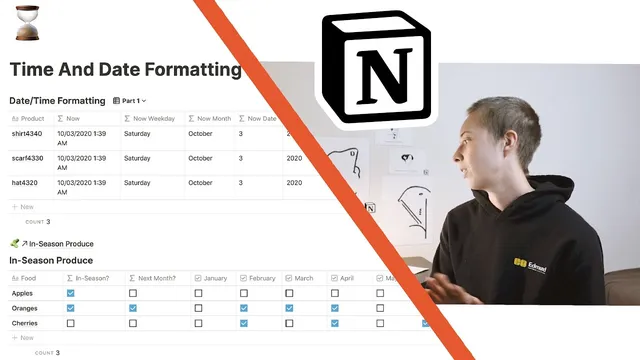
Two practical use cases show how these pieces fit together. First, an “in season produce” database uses the month() function to tick a boolean per month. A formula like “if month(now()) equals 8 (September) then true else false” is copied across months, and a database view filters to items where the relevant month’s checkbox is true—so the view automatically updates as the calendar changes.
Second, a timesheet example builds from date arithmetic. dateSubtract and dateAdd handle offsets like “two days ago,” “two weeks from now,” or “two months from now,” with careful attention to whether the source includes time. For date ranges, dateBetween calculates days between an end date and a start date, while mod is used to extract leftover hours and minutes (e.g., hours = mod(totalHours, 24) and minutes = mod(totalMinutes, 60)). Finally, the timesheet sums clock-in/clock-out durations across Monday through Friday, converts minutes to hours by dividing by 60, and multiplies by an hourly rate to compute weekly pay automatically per row.
Cornell Notes
Notion formulas can reshape date/time data into useful outputs by combining formatDate with date math and conditional logic. formatDate(now(), …) supports extracting weekday, month, day suffixes, year, time (12-hour or 24-hour), timezone, and quarter using specific tokens. For offsets and ranges, dateSubtract and dateAdd shift dates while dateBetween measures elapsed time; mod helps break elapsed time into hours and minutes. These tools power two examples: an “in season” produce filter driven by month(now()) and a Monday–Friday timesheet that sums minutes across days, converts to hours, and multiplies by an hourly rate to estimate weekly earnings.
How does formatDate(now(), …) turn a timestamp into a weekday, month, and year in different forms?
Why does dateSubtract behave differently when subtracting from now() versus a date property?
What’s the limitation with timestampNow(), and what’s the workaround?
How does the “in season produce” database automatically update based on the current month?
How are hours and minutes extracted from a date range for a timesheet?
How does the Monday–Friday timesheet compute weekly pay from clock-in/out times?
Review Questions
- Which formatDate tokens (and casing) would you use to output time in 24-hour format versus 12-hour format with am/pm?
- How would you adjust a dateSubtract result to display only the date when the source includes time?
- What role does mod play when converting a date range into hours and minutes for a timesheet?
Key Points
- 1
formatDate(now(), …) can extract weekday, month (numeric/abbreviated/full), year (two-digit or four-digit), and time (12-hour or 24-hour) using token casing and repetition.
- 2
Timezone output can be added via z tokens, and quarter can be derived with q (plus an optional o token for ordinal-style output).
- 3
timestampNow() is limited to minutes; formatDate(now(), x) (or X) provides a longer timestamp alternative.
- 4
dateSubtract and dateAdd preserve time when starting from now(), so date-only display requires formatting or a date-only source property.
- 5
dateBetween measures elapsed time across a range, while mod is used to split elapsed time into remaining hours and minutes.
- 6
A practical timesheet sums minutes across Monday–Friday, converts to hours, and multiplies by an hourly rate to estimate weekly pay automatically.
- 7
An “in season” database can be driven by month(now()) with copied boolean formulas per month and a view filter for the active month.