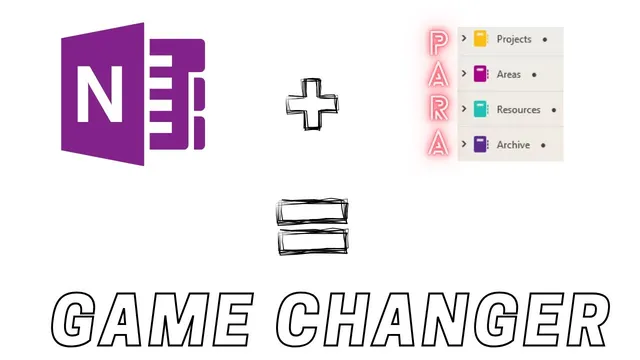
I Implemented PARA in Microsoft OneNote
Based on Duddhawork's video on YouTube. If you like this content, support the original creators by watching, liking and subscribing to their content.
PARA sorting in OneNote uses status: active work goes to Projects, ongoing responsibilities to Areas, reference material to Resources, and obsolete items to Archive.
Briefing
Thiago Forte’s PARA system—Projects, Areas, Resources, Archive—gets a practical makeover inside Microsoft OneNote, turning scattered “captured” ideas into a weekly workflow that ends with actionable next steps. The core move is simple: anything still useful gets sorted into Projects or Areas, while completed or no-longer-needed items get pushed into Archive, keeping the notebook from becoming a passive storage bin.
The setup begins with weekly capture and review. Notes are collected throughout the week using a phone, a computer, or web snippets, then reviewed mostly on Sundays. OneNote’s quick-capture “badge” triggers a card that drops new items into the right place during review. The example list shows how the same kind of raw note can land in different PARA buckets depending on its status.
Summer goals that no longer apply—like surgery that was delayed—are immediately treated as Archive material. Article ideas and content prompts (e.g., “Food tactics,” “Pro tip,” “Google tips,” “Favorite episodes”) are kept near the top as Projects or Resources until they’re ready to be worked on. Items already completed, such as an earlier “favorite episodes” post idea, are deleted to avoid clutter. Active work stays in Projects: “Live chapters” is treated as something currently in progress, while other ideas remain parked until the right time.
Areas function as ongoing responsibilities tied to teaching and life maintenance. Teaching-related materials—quotes for communication, self-checking concept checklists, and course-specific items—are assigned to Areas and then routed to supporting tools like a Google site or Microsoft To Do once they become concrete tasks. Even personal administration shows up in Areas: receipts (including snip premium and a Dyson air purifier purchase) are filed under income tax, while gift and shopping interests (Patagonia shirt, shoes) are tracked as Areas-like lists.
The workflow also handles “someday/maybe” interests without letting them dominate the system. TV and movie recommendations (including “The Bear” on Disney plus, plus “Emmett Till and Latender Niti”) are stored for later, reducing endless scrolling. Health and movement plans are treated as time-sensitive: a Tai Chi reminder is scheduled for after surgery, reflecting how PARA can blend with calendar-based execution.
A key justification for PARA centers on action and retrieval. Tag-based or purely hierarchical filing can scatter notes so they “collect dust,” while a project-centered structure forces decisions: what’s active, what’s ongoing, what’s reference, and what can be archived. After roughly six months, the weekly review is described as fast—about five to 20 minutes depending on note volume—and flexible enough to recover even after missed weeks. The result is a OneNote system that stays lightweight, supports weekly planning, and routes tasks into the right execution tools when they’re ready to move.
Cornell Notes
The PARA method is implemented in Microsoft OneNote to keep captured notes usable instead of buried. During a weekly Sunday review, items are sorted into Projects (active work), Areas (ongoing responsibilities like teaching and admin), Resources (reference material), or Archive (completed or obsolete items). The workflow emphasizes action: project-centered organization makes it easier to decide what to do next, while tag-only or deep hierarchies can lead to notes “collecting dust.” The system also integrates with other tools—Notion dashboards, Google Calendar, Google Sites, and Microsoft To Do—once notes become tasks or content plans. The weekly review is reported to take about 5–20 minutes, even when some weeks are missed.
How does the system decide whether an item belongs in Projects, Areas, Resources, or Archive?
What does a weekly review look like in practice inside OneNote?
Why does the project-centered approach beat a tag-only or purely hierarchical filing system?
How are teaching-related notes turned into real outputs beyond OneNote?
How does the system handle “someday/maybe” interests without losing control of the workflow?
What’s an example of integrating PARA with time-based execution tools?
Review Questions
- When would a captured item be archived versus kept as a Project or Area, and what signals in the note determine that choice?
- How does routing notes into tools like Google Calendar, Google Sites, and Microsoft To Do change the outcome compared with leaving everything in OneNote?
- What specific failure mode does the transcript associate with tag-only or hierarchical note systems, and how does PARA address it during weekly review?
Key Points
- 1
PARA sorting in OneNote uses status: active work goes to Projects, ongoing responsibilities to Areas, reference material to Resources, and obsolete items to Archive.
- 2
A Sunday weekly review turns phone/web captures into decisions, not just storage, with each note dragged into the right bucket.
- 3
Completed content ideas may be deleted to prevent clutter, while delayed or irrelevant goals are archived immediately.
- 4
Teaching notes are routed into execution channels like Google Sites and Microsoft To Do once they become concrete tasks or course materials.
- 5
“Someday/maybe” recommendations are kept separate from active work to reduce scrolling while preserving focus.
- 6
The project-centered structure is credited with preventing notes from “collecting dust,” unlike tag-only or deep hierarchies.
- 7
The weekly review is reported to take about 5–20 minutes and remains workable even after missed weeks.