My 2023 Obsidian Workflow for Note-Taking and Templated Thinking
Based on Systematic Mastery's video on YouTube. If you like this content, support the original creators by watching, liking and subscribing to their content.
Treat the second brain as a daily decision tool: optimize for reduced friction in capture and follow-up, not for elaborate setups.
Briefing
Templated thinking in Obsidian is presented as a practical way to turn a “second brain” from a hobby into a daily decision-making system—by lowering the friction of capturing ideas and by using structured prompts to improve how people plan, reflect, and choose. The core message is blunt: productivity setups only matter if they change day-to-day behavior and help reach real goals, not if they consume time through endless tool optimization.
The workflow starts with consistency. Instead of relying on long note sessions at a computer, the system emphasizes quick capture and later refinement. For that, the creator uses an inbox approach: Todoist for quick capture tasks, and iA Writer for fast markdown-style writing that can be synced across devices. Notes live in cloud storage and are mirrored to an iPhone and macOS devices, keeping the same structure across Apple hardware. The key behavioral insight is that the “threshold” to use a second brain is often too high—people don’t have time to organize during the day—so the system intentionally creates small, low-effort actions that keep ideas “alive” until later. Quick capture, reflections, and knowledge mapping are highlighted as the main areas where this friction reduction pays off.
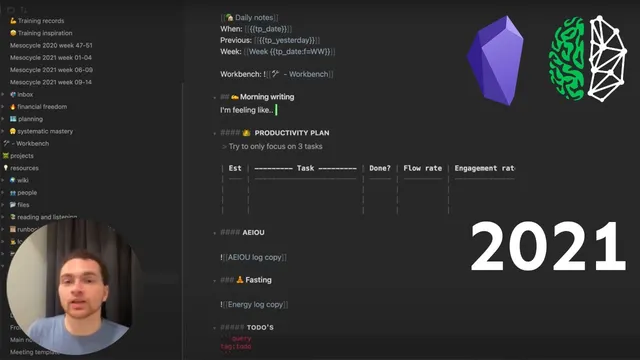
From there, the workflow adds feedback loops that make thinking measurable. Daily notes include a “productivity plan” built around Pomodoro estimates, plus end-of-day metrics like flow and engagement rates. A minor reflection prompt is used to increase self-awareness—tired, stressed, or otherwise—because that awareness supports better self-regulation. An energy log tracks variables such as fasting time, coffee intake, meditation, workouts, and a deep work score, with the creator stressing that strictness isn’t required; “good enough” tracking supports continual improvement. A to-do mechanism is also embedded so tasks can be created inside notes and revisited later.
The most concrete implementation is the daily note template, generated automatically via the templater plugin and tied into Obsidian’s Daily Note plugin settings. Macros like tp date, tp yesterday, and tp date f (week number) populate fields automatically. The daily note also links to a “workbench” note via the Workbench plugin, serving as a running scratchpad for work-in-progress items so unfinished tasks don’t vanish. In practice, the creator links daily notes into weekly reflections and uses local graph views to navigate from weeks to days to meetings.
Several additional templates extend the same idea of structured thinking: - A postmortem template for fast, blame-light reflection after mistakes, designed to preserve lessons and check whether they were applied later. - A decision journal template inspired by Atomic Habits, aimed at big decisions by forcing consideration of current state and consequences. - A mesocycle template (four to five weeks) for training goals like calisthenics progress, including measurement exercises and “focus exercises” when motivation or energy is low. - A meeting template that keeps notes lightweight: agenda, discussion topics, and action points, with notes linked to the day and optionally parked in the workbench for later follow-up.
Overall, templated thinking is framed as a way to build a personal system of prompts—questions tailored to weaknesses—so the second brain becomes an externalized product that improves decision quality through repeated feedback, not a static archive.
Cornell Notes
The workflow treats Obsidian as a decision-support system built on “templated thinking,” where templates reduce friction and turn reflection into actionable feedback. Consistency is achieved through quick capture (inbox-style notes) and daily notes that are auto-generated using the templater plugin with macros like tp date and tp yesterday. Daily notes also embed planning (Pomodoro-based estimates), self-awareness prompts, and an energy log to track engagement and deep work. A workbench note collects work-in-progress so unfinished items don’t disappear, and graph views connect daily notes to weekly reflections and meeting notes. Additional templates—postmortems, decision journals, mesocycles, and meetings—extend the same structure to learning, big choices, training cycles, and meeting follow-through.
Why does the workflow emphasize quick capture instead of perfect note-taking sessions?
How does the daily note template automate structure, and what role do plugins play?
What is the “workbench” for, and how does it prevent work from getting lost?
What metrics and prompts are used to turn daily reflection into feedback?
How do the postmortem and decision journal templates differ in purpose?
How does the meeting template balance note-taking with actually attending the meeting?
Review Questions
- Which parts of the workflow are designed specifically to reduce friction, and how do they change daily behavior?
- How do templater macros (like tp date and tp yesterday) support linking daily notes into weekly reflections and graph navigation?
- What distinguishes a postmortem template from a decision journal template in timing and intended outcome?
Key Points
- 1
Treat the second brain as a daily decision tool: optimize for reduced friction in capture and follow-up, not for elaborate setups.
- 2
Use an inbox-style capture system so ideas enter the system immediately, then get structured later when time allows.
- 3
Generate daily notes automatically with templater macros configured through the Daily Note plugin to keep structure consistent without manual effort.
- 4
Embed planning and feedback loops in daily notes using Pomodoro estimates, flow/engagement ratings, and short self-awareness prompts.
- 5
Use the Workbench plugin as a single place for work-in-progress so unfinished items don’t vanish and can be revisited efficiently.
- 6
Apply specialized templates—postmortems, decision journals, mesocycles, and meetings—to make reflection, choices, training cycles, and meeting follow-through repeatable.