Notion Build With Me: A Spaced Repetition Database
Based on Red Gregory's video on YouTube. If you like this content, support the original creators by watching, liking and subscribing to their content.
Each study session becomes a row in a Notion revision database, with formulas computing “next study date” from an “understanding” level.
Briefing
A spaced-repetition system built directly in Notion can turn existing flashcard-style notes into a self-updating schedule—tracking each study session, grading recall with a “total correct” score, and automatically computing the next review date based on how well the material was understood. The core idea is to store every study session as a row in a revision database, then use formulas to decide whether the next study should happen immediately (same day), the next day, or several days later.
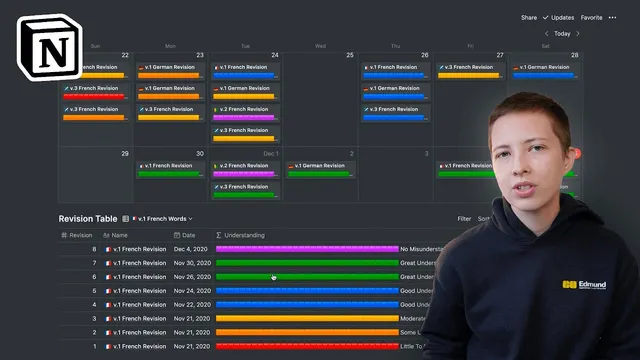
The workflow starts with a “main revision table” where each row represents one study session for a specific deck (e.g., “v1 French revision”). Key fields include the study date, a calculated “next study date,” the total number of flashcards (total toggles), and a “total correct” input that the user fills in after toggling through answers. Each flashcard is implemented as a Notion toggle: the user reveals the answer, marks it correct, and moves on. At the end of the session, the user enters how many toggles were correct; a “revision number” and an understanding score then drive scheduling.
Understanding is handled in two ways. First, a simple template uses a formula that maps low performance to “little to no understanding,” which keeps the next study date on the same day. Higher performance shifts the next review further out: moderate understanding pushes the next date by +1 day, good understanding by +2 days, and great understanding by +4 days. At the top of the table, sorting by revision descending ensures the most recent session appears first, while the calendar view shows upcoming reviews by “next study date,” not the original study date. Each study session retains a snapshot of correct/incorrect outcomes, letting users revisit history.
To scale beyond one deck, the system duplicates the table view and filters by deck name (e.g., “v2 French revision,” “v3 French revision”). A linked database and calendar view then consolidate all scheduled sessions so the user can filter down to what’s due “today.”
The second major step is automation for users already using Notion toggles as flashcards. Instead of manually setting understanding, the template computes it from performance: it checks whether “total correct” is empty (showing a “processing” indicator for aesthetics), then uses percentage thresholds (e.g., ≤30% for little to no understanding, ≤55% for some understanding, ≤70% for moderate understanding, and higher ranges for good/great/no misunderstandings). The computed understanding feeds back into the “next study date” formula, so the schedule updates automatically as soon as “total correct” is entered.
Overall, the build turns Notion into a spaced-repetition engine: study sessions become data, performance becomes a graded signal, and review timing becomes formula-driven—complete with deck templates, nested inline templates for groups of cards, and a calendar-based “what to study next” view.
Cornell Notes
The system builds spaced repetition in Notion by representing each study session as a row in a revision database. After studying a deck’s toggle-based flashcards, the user enters “total correct” and “total cards,” and formulas convert performance into an “understanding” level. That understanding level then determines the “next study date,” ranging from same-day repeats for low recall to multi-day delays for high recall. Decks are separated using filters like “v1 French revision” and “v2 French revision,” while a linked calendar view surfaces what’s due today. For existing Notion toggle users, nested templates and inline card templates automate the grading logic so scheduling updates automatically.
How does the database decide when to schedule the next review after a study session?
What role do Notion toggles play in the spaced repetition workflow?
How are multiple decks handled without duplicating the entire system?
Why does the system keep a snapshot of each study session’s outcomes?
How does the automated “understanding” formula work for toggle-based flashcards?
What’s the purpose of nested templates (database template → group template → flashcard template)?
Review Questions
- If “understanding” is set to moderate understanding, how should the “next study date” change relative to the original study date?
- What inputs does the automated understanding logic use, and how is the correctness percentage computed?
- How does the system ensure the calendar view shows what’s due next rather than when the material was first studied?
Key Points
- 1
Each study session becomes a row in a Notion revision database, with formulas computing “next study date” from an “understanding” level.
- 2
Notion toggles function as flashcards; the user marks correctness during the session and records “total correct” afterward.
- 3
Low recall triggers same-day re-study, while higher recall pushes reviews forward by fixed day increments (e.g., +1, +2, +4, +7).
- 4
Decks are separated using a deck-identifying property (e.g., “v1 French revision,” “v2 French revision”) and filtered views.
- 5
A linked calendar view sorts by “next study date,” making “what to study today” a filterable, centralized queue.
- 6
Nested templates (session → group → flashcard) automate the creation of new toggle-based card sets and keep the workflow consistent.