Notion Dashboard: How To Make A Language Dictionary (Auto Synonyms)
Based on Red Gregory's video on YouTube. If you like this content, support the original creators by watching, liking and subscribing to their content.
Build a central “word bank” that stores translation concepts, then connect each language database to it via a Translation relation.
Briefing
A Notion “polyglot language dictionary” template can automatically surface synonyms by linking words through shared translations—then reusing that logic across multiple languages with minimal extra setup. The core idea is a central “word bank” that stores each word’s language-specific entry (German, French, Spanish, etc.), while a self-referential database plus a rollup-based filter identifies other words that share at least one translation. That means adding a new word to any language database can instantly populate related entries and synonym lists without manual cross-referencing.
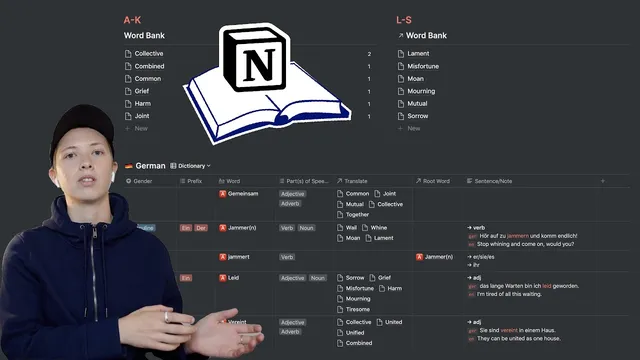
The build starts with a “word bank” list database split into three aesthetic sections (A–K, L–S, T–Z). Each language gets its own database (for example, a German database with properties like Word (renamed from Name), Gender, Part of Speech, Example Sentence/Note, Prefix, and a Relation property called Translation). The key connection is that every language entry links back to the word bank via that Translation relation. When a German word is assigned a translation (e.g., multiple German words mapped to the same translation concept), the corresponding word bank entry updates automatically.
Synonyms are generated using a self-referential database template. Inside each word bank entry, a “synonyms” section creates a linked database view that points back to the current language database (using Notion’s linked database feature). A filter then uses the rollup hide property—configured to “contain” the current word’s name—so the view only shows other words whose rollup-derived translation matches the current entry. The rollup hide acts like a window into the word bank’s related properties, letting the synonym view match on shared translation rather than on the word text itself.
The workflow also handles verb conjugation. A “root word” relation (with sync both ways) links conjugated forms back to a root entry, and a rollup-derived property (e.g., “c” / “c also”) pulls in related conjugations. This keeps the dictionary usable for learners who need both base forms and inflected variants.
To scale beyond one language, the template duplicates the language database (e.g., copy German to French, then to Spanish). After duplication, the rollup hide configuration is adjusted to point to the new language relation (German → French, then French → Spanish). Because each language database still connects to the same word bank through Translation, synonym automation and cross-language lookup continue to work.
A practical use case ties the dictionary to translation practice. When a word appears in a documents page (with French on one side and a translation on the other), the user can create a new dictionary entry from that word. The entry automatically lands in the correct language database and triggers the synonym template. To avoid editing friction when importing many words at once, an “edit later entry” template uses a checkbox (cf) and a dedicated “edit later” view filtered to cf = checked, so newly imported words are easy to find and complete later.
Overall, the template turns Notion into a structured, multi-language vocabulary system where shared meaning (via translation relations) drives synonym discovery and keeps language expansion mostly a matter of duplication and swapping rollup targets.
Cornell Notes
The template builds a multi-language language dictionary in Notion where words become connected through shared translations. A central “word bank” receives entries via a Translation relation from language-specific databases (German, French, Spanish, etc.). Synonyms are automated using a self-referential linked database view filtered by a rollup hide property that matches other entries sharing the same translation. Because each language database links to the same word bank, duplicating a language database and updating the rollup target (e.g., German → French) extends the system with minimal rework. A practical “edit later” workflow uses a checkbox and filtered view so imported words are easy to complete later.
How does the template connect multiple languages to a single synonym system?
What role does the rollup hide property play in generating synonyms?
Why use a self-referential linked database inside the word bank entry?
How does the system handle conjugated verbs differently from other parts of speech?
What makes adding a new language mostly a duplication task?
How does the “edit later” workflow prevent imported words from becoming hard to manage?
Review Questions
- If two different German words map to the same word bank translation, what mechanism ensures they appear together as synonyms?
- What specific configuration change is required when duplicating the German database to create French or Spanish?
- How does the root word relation improve handling of verb conjugations compared with treating every verb form as unrelated?
Key Points
- 1
Build a central “word bank” that stores translation concepts, then connect each language database to it via a Translation relation.
- 2
Use a rollup hide property to pull word bank information into the language database context so synonym logic can be automated.
- 3
Create a self-referential synonyms template using a linked database view filtered by rollup hide “contain” matching against the current entry.
- 4
Handle verb conjugations with a root word relation (sync both ways) so conjugated forms stay organized under a base entry.
- 5
Scale to new languages by duplicating an existing language database and updating the rollup hide target to the new language relation.
- 6
Use an “edit later” template with a cf checkbox and a filtered view to manage bulk imports from translation documents without losing track of incomplete entries.