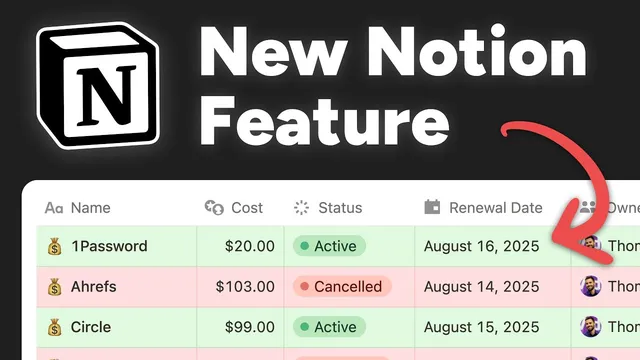
Notion just added one of Excel's best features
Based on Thomas Frank Explains's video on YouTube. If you like this content, support the original creators by watching, liking and subscribing to their content.
Notion’s conditional color feature applies automatic background colors to database items based on property-driven rules.
Briefing
Notion has added conditional formatting—specifically “conditional color”—bringing one of Excel’s most familiar productivity tricks into Notion databases. The practical payoff is simple: pages can automatically change background color based on database properties, so overdue work, high-priority items, or “good vs. bad” thresholds stand out instantly without manually updating anything.
The walkthrough starts with a task manager view where items due today are mixed with overdue tasks. By opening the view’s settings and creating a new conditional color rule, the system lets users choose a database property (like a due date), set a condition (“date is before today”), and apply a background color (red for overdue). The result is visual separation inside the same view—overdue tasks become unmistakable at a glance, while tasks due today remain in their default styling.
From there, conditional color expands beyond simple table layouts. In a gallery-style recipe tracker, the feature works even though conditional formatting in spreadsheets is typically cell-based. Notion’s support across layouts means the same rule logic can highlight cards in board, gallery, and other view types. A favorite-recipes example uses a checkbox (boolean) property: when “favorite” is checked, the recipe card background turns yellow, making starred items pop without filtering them out of the gallery.
A third example targets creators. In a content planning system, video performance metrics pulled from the Notion API and the YouTube Data API are used to highlight finished videos with view counts above a threshold (e.g., 500,000). Conditional color then turns those high-performing cards green, making it easier to scan for inspiration and identify what resonated.
The tutorial then gets more advanced with stacked rules. Multiple conditional color rules can be added to the same view—such as red for overdue tasks and yellow for high-priority tasks. If a page matches more than one rule, only the topmost rule’s color applies, preventing messy “blended” colors and keeping the visual logic predictable.
Notion’s conditional color also has boundaries. Layout support is broad, but charts and forms don’t fit the model because they don’t display individual rows. Property support is limited to “simple writable” database properties—directly editable fields like text, numbers, selects, statuses, and checkboxes. Properties like formula, relation, and rollup are not supported for conditional color, even though formulas can be used in database filters. That gap matters in the creator’s expense tracker, where “renewal date” is a formula-derived date; highlighting upcoming renewals would be ideal, but the rule can’t be based on that formula property yet.
Finally, the feature is positioned as “conditional color,” not full conditional formatting. Unlike Excel/Sheets, it only changes background color—no text styling (bold/underline/strike) and no color scales. The creator argues that color scales (gradients like red-to-white-to-green) would be a more valuable next step than extra text formatting, since they provide nuanced feedback rather than a single binary highlight. The overall message: Notion’s conditional color is already useful across many views, but formula-based rules and richer formatting would unlock the same depth people expect from spreadsheets.
Cornell Notes
Notion’s new “conditional color” feature adds spreadsheet-style visual rules to Notion databases. Users can set background colors based on database properties—like turning overdue tasks red using a due-date condition, or highlighting favorite recipes yellow using a checkbox property. The feature works across multiple view layouts (including gallery-style cards) and supports multiple stacked rules, with the top matching rule determining the final color. Limitations remain: charts and forms don’t support it, and only certain “simple writable” properties can drive rules—formula, relation, and rollup are currently excluded. The missing pieces matter most for workflows that rely on formula-derived dates, such as tracking upcoming subscription renewals.
How does conditional color replace manual sorting or filtering for task status?
Why does conditional color feel more powerful in gallery views than in spreadsheets?
What’s the difference between filtering and conditional color highlighting?
What happens when multiple conditional color rules match the same page?
Why is formula support a big deal for conditional color?
What improvements would bring conditional color closer to Excel’s conditional formatting?
Review Questions
- Which property types can drive conditional color rules, and which key property types are currently excluded?
- In a stacked-rule setup, how does Notion decide which color to apply when multiple rules match the same page?
- Give one example of how conditional color can highlight information without filtering it out of the view.
Key Points
- 1
Notion’s conditional color feature applies automatic background colors to database items based on property-driven rules.
- 2
Overdue tasks can be highlighted by creating a rule that sets page background red when a due date is before “today.”
- 3
Conditional color works across many view layouts, including gallery-style card views, not just table views.
- 4
Multiple conditional color rules can be stacked, and only the topmost matching rule determines the final color for a page.
- 5
Conditional color supports only certain “simple writable” property types; formula, relation, and rollup properties can’t currently be used as rule inputs.
- 6
Charts and forms don’t support conditional color because they don’t display individual database rows in the same way.
- 7
The feature is closer to “conditional coloring” than full Excel-style conditional formatting; color scales and richer text styling are potential next upgrades.