Robert Greene And Ryan Holidays' note-taking system in Obsidian
Based on Joshua Duffney's video on YouTube. If you like this content, support the original creators by watching, liking and subscribing to their content.
Separate project-specific notes into a dedicated Obsidian vault to prevent general knowledge from blending with writing work.
Briefing
A practical note-taking system for long-form writing is only useful if it stays aligned with the writer’s workflow—so the system should help a project “hold shape” instead of forcing the mind to constantly re-sort ideas. After months of using Zettelkasten-style methods (including Smart Notes) to organize research, the creator hit a capacity limit: general knowledge and project-specific notes started blending together until the project became hard to think about. The fix was to separate the writing effort into its own Obsidian vault and organize it using a Robert Greene / Ryan Holiday approach—built around research cycles, emergent themes, and a folder structure that mirrors how chapters take form.
Greene and Holiday’s research process begins with book structure. Once the outline’s parts are defined, research starts: books are read carefully, marked up heavily, and notes are taken in batches. The key rhythm is time-based filtering—notes are captured, then the material “sits” long enough for weaker ideas to fall away. After that, notes are produced in a focused session spanning multiple days. The creator reports that strong books typically yield around 20–30 notes, with fewer notes often correlating with lower note-taking payoff (not necessarily worse reading).
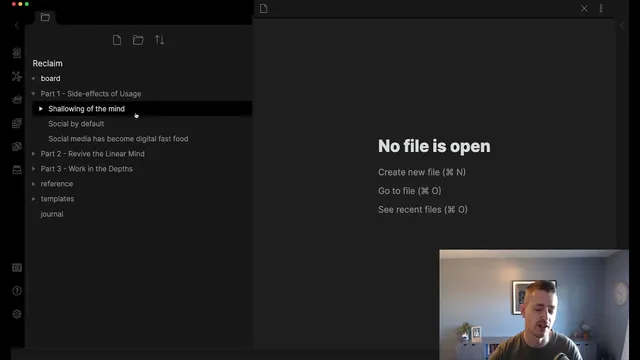
Instead of building a bottom-up knowledge graph, the system uses a top-down container first: three project “parts” (Part 1, Part 2, Part 3). New notes land in the vault root as a queue—analogous to stacking index cards before sorting them into boxes. As research accumulates, themes emerge naturally. Once a theme becomes clear, notes are dragged from the part folders into theme subfolders that can later become chapters or sections. A concrete example comes from reading Nicholas Carr’s The Shallows: after taking roughly 30 notes about neuroplasticity and how the internet differs from other media, the creator groups them under a “shallowing of the mind” theme, ready to become a chapter or section when writing begins.
The same structure supports later thematic development. After Cal Newport’s A World Without Email, the creator’s Part 3 theme becomes “Working the Depths” (working title), with a broader “Life of Less Convenience” / digital minimalism thread. Notes from Newport’s ideas also spawn sub-themes such as “Escape Your Inbox,” which then branches into practical concerns like task boards, improving meetings, and communication overload.
To make retrieval and citation reliable, each source gets a dedicated reference note. For each book or article, the reference note stores bibliographic metadata (author, title, publisher, publish date, ISBN, and editions) and links to all notes taken from that source. Notes follow templates and types: summary notes, paraphrases, and quotes. Quotes are formatted using a community plugin (Adminer/“admin nation” as referenced), which creates clean quote callouts.
Finally, the workflow borrows from software engineering: a Kanban board tracks reading and research progress. Columns include Backlog (prioritized reading), Ready (next up), Doing (currently paused for meta-learning on research craft), Waiting (e.g., “Escape Your Inbox” chapter work), and Done (e.g., Perennial Seller once notes are completed). The result is a system that helps the writer re-enter the project quickly, pause without losing context, and use folder-based bucketing to turn research into an outline for drafting.
Cornell Notes
The core shift is separating project notes into a dedicated Obsidian vault and organizing them with a Greene/Holiday workflow rather than a bottom-up knowledge graph. Research starts after the book’s parts are sketched, then books are read carefully, marked up, and followed by batched note-taking sessions that allow time to filter out weaker ideas. Notes begin in a root “queue” and get sorted into Part 1–3 folders; as enough notes accumulate, themes emerge and are dragged into theme subfolders that can later become chapters or sections. Each source gets a reference note with full bibliographic metadata and links to all related notes, using templates for summaries, paraphrases, and quotes. A Kanban board adds a progress layer—tracking what to read, what to take notes on, and what chapters are waiting to be written—so the system supports writing momentum instead of overwhelming the mind.
Why did the writer abandon Smart Notes/Zettelkasten-style organization for this project?
What does the Greene/Holiday-inspired research rhythm look like in practice?
How does the system turn scattered notes into an outline?
What role do reference notes and templates play in retrieval and citation?
How does the Kanban board support the research workflow beyond note storage?
Review Questions
- How does the vault’s three-part structure (Part 1–3) change the way themes are formed compared with a bottom-up graph approach?
- What specific metadata and linking strategy makes reference notes useful when revisiting ideas later?
- In what ways does batching note-taking and allowing time to “sit” affect the quality of notes produced?
Key Points
- 1
Separate project-specific notes into a dedicated Obsidian vault to prevent general knowledge from blending with writing work.
- 2
Start with a high-level outline (three parts) so notes have a place to go before themes fully form.
- 3
Use a root “queue” for new notes, then sort into part folders and later into theme subfolders as patterns emerge.
- 4
Adopt source reference notes with full bibliographic metadata and link every note back to its source plus page numbers.
- 5
Standardize note types with templates (summary, paraphrase, quote) to make retrieval and reuse faster.
- 6
Track research progress with a Kanban board so reading, note-taking, and chapter writing states stay visible.
- 7
Batch note-taking sessions and let ideas sit briefly to improve signal-to-noise before committing to themes.