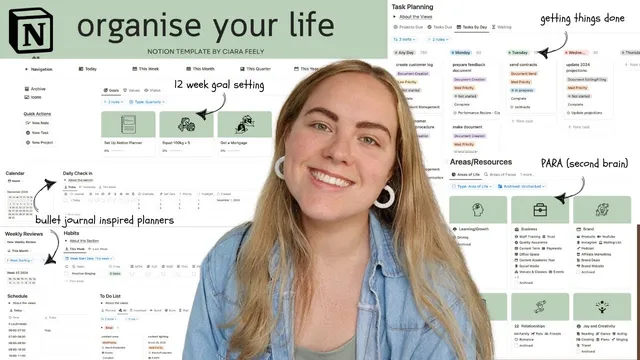
The 2025 Notion Planner - How I Organize My Life
Based on Ciara Feely's video on YouTube. If you like this content, support the original creators by watching, liking and subscribing to their content.
The template’s main value is linking 12 Week Year goal scoring to GTD-style task processing so goals and to-dos stay in the same workflow.
Briefing
A Notion life-planning template built around David Allen’s Getting Things Done (GTD) system now links directly to 12 Week Year goal setting—closing the gap between high-level ambitions and the day-to-day task workflow that many people struggle to maintain. The core promise is practical: goals, projects, habits, and weekly planning stay connected through automations and linked databases, so progress tracking doesn’t live in a separate universe from the to-do list.
The system starts with a multi-layer structure that expands beyond basic task and project management into “areas of focus,” values, and a broader vision for life. That structure is organized through yearly, quarterly, monthly, weekly, and daily planning spreads—designed to recreate the feel of bullet journaling while keeping everything searchable and mobile-friendly. The template is also tailored for someone dealing with anxiety, with the emphasis on reducing overwhelm by focusing attention on what’s actionable now.
Yearly planning is date-agnostic and uses a “year at a glance” calendar that auto-fills via a custom formula. Each year, quarter, month, and week has reflection spaces stored in databases, allowing users to look back across time and compare achievements and challenges. A vision board database sits above goals, organized by “area of life” (such as Learning/SLG/Growth, Business/Brand/Research, Relationships, Home/Health/Well-being, and Finances), then broken down into “areas of focus” (more specific interests like skills or classes). Vision items include fields for achievement status, photos, and automatic date stamping when marked achieved.
The quarterly layer is where the “magic” happens. It integrates 12 Week Year mechanics: quarterly reviews show goal progress, and each 12WE goal has its own scorecard. A key setup requirement is entering a goal start date—without it, the generated weekly plan won’t populate correctly. Once configured, the template creates a dated 12-week schedule with scorecards that evaluate weekly completion across habits, tasks, and projects. Users can track metrics (e.g., “amount saved”) week by week, then compute averages or maxima depending on the metric.
Projects, tasks, and habits are planned inside the goal framework. Projects can be assigned to specific weeks, and tasks inherit planned dates from their parent projects. Habits can be set with frequencies (including repeating patterns like “7 times a week”), and the weekly plan updates based on the goal’s start date. Automations also support operational tracking: moving a task to “in progress” triggers start time capture; marking it “done” records completion time and duration. Project status changes cascade to related tasks, and task completion can update project completion.
Weekly planning follows GTD-style processing: unprocessed tasks and projects are reviewed, then “processed” tasks are routed into a to-do list organized by context (and filtered views like “important,” “quick,” “coming up soon,” and “waiting for”). The daily planner then focuses on an “ideal day” habit checklist, gratitude/self-care/priorities, and a schedule that’s formula-driven by day-of-week. A navigation layer with synced blocks makes the template usable on mobile, letting users jump to the relevant section quickly.
Overall, the template is presented as a comprehensive planning and note-taking system—built to feel like bullet journaling, run like GTD, and measure progress like the 12 Week Year—at the cost of significant upfront design time and setup effort.
Cornell Notes
The template merges GTD-style execution with 12 Week Year goal setting inside a single Notion system. Yearly, quarterly, monthly, weekly, and daily planning spreads are organized through linked databases and date-aware (or date-agnostic) views, so reflections and reviews can be revisited over time. The quarterly “12WE” layer generates a dated 12-week plan from each goal’s start date, then scores weekly progress using completion across habits, tasks, and projects plus optional custom metrics. Automations capture time tracking and cascade status changes between tasks and projects, reducing manual admin. The result is a workflow where high-level vision and goals stay connected to the to-do list rather than becoming separate tracking systems.
How does the template connect 12 Week Year goals to day-to-day task execution instead of treating them as separate trackers?
What role do “areas of life” and “areas of focus” play in the system’s structure?
What makes the yearly planning views feel “bullet-journal-like” while still being database-driven?
How does GTD-style task processing work inside the weekly review?
What automations reduce manual tracking for time and status?
Why is the daily planner built around an “ideal day” habit checklist?
Review Questions
- What specific setup input is required for the 12WE plan to generate correct weekly dates, and what breaks if it’s missing?
- Describe the flow of a task during the weekly review: where it starts, what fields must be filled, and where it ends up.
- How do the template’s automations handle time tracking and the relationship between projects and tasks?
Key Points
- 1
The template’s main value is linking 12 Week Year goal scoring to GTD-style task processing so goals and to-dos stay in the same workflow.
- 2
Yearly, quarterly, monthly, weekly, and daily planning spreads are implemented through linked databases and filtered views, with some calendars auto-generated via formulas.
- 3
Vision items are organized by “area of life” and “area of focus,” and achievement status can automatically stamp an achieved date.
- 4
Quarterly 12WE goals generate a dated 12-week plan from a required start date, then score weekly progress across habits, tasks, and projects plus optional custom metrics.
- 5
Weekly review includes a processing workflow that routes tasks into context-based to-do lists after next action, context, priority, and estimated time are added.
- 6
Automations capture task start/completion times and cascade project/task status changes to reduce manual admin.
- 7
Mobile usability is supported through synced navigation blocks and quick actions that open forms for fast task or note capture.