Easy Spaced Repetition Formula In Notion
Based on Red Gregory's video on YouTube. If you like this content, support the original creators by watching, liking and subscribing to their content.
Use Notion’s dateAdd function to compute a “next review” date from an original review date plus a day offset.
Briefing
Spaced repetition in Notion can be automated with a single “push the next review date” formula that moves review sessions forward whenever a user marks progress. The core setup starts with a database that tracks an original review date and then uses checkboxes (or select fields) to trigger date changes. When “session 1” is completed, the formula adds a fixed number of days to the “next review” date; additional sessions can stack those intervals so later sessions push the review further out.
The walkthrough begins with a database containing subjects and a date property representing the first time a note is reviewed. A checkbox called “session 1” is added, and a formula property (“next review”) uses Notion’s dateAdd function: if session 1 is checked, it adds three days to the original date; if not, it leaves the date unchanged. To extend the system, “session 2” and “session 3” are added as additional checkboxes. The formula is adjusted so each checked session adds another three-day interval—effectively turning session 1 into +3 days, session 2 into +6 days, and session 3 into +9 days. The ordering of conditions matters: session-related conditions are placed so earlier checks respond first and later checks respond last, ensuring the correct total offset is applied.
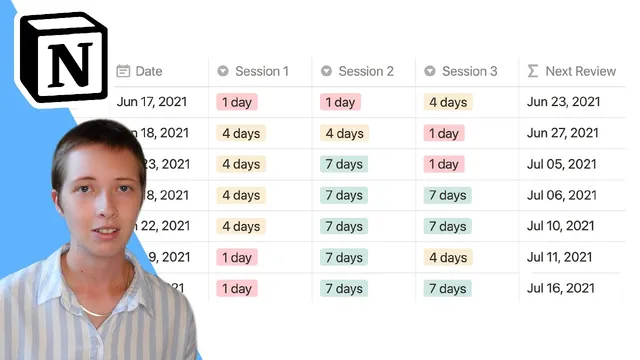
A second approach replaces checkboxes with select properties to make the scheduling depend on performance rather than just completion. For each session (session 1, session 2, session 3), a select field offers options like “poor,” “good,” and “great,” each mapped to a specific number of days to push the review forward (for example, 1 day for poor, 4 days for good, and 7 days for great). Instead of hardcoding values, the formula pulls the numeric day offset from the select option and sums the offsets across sessions. That sum then feeds directly into dateAdd, so the next review date moves relative to the original date based on how well the material was understood.
Once scheduling logic is in place, the system becomes usable through views and filters. Sorting by the closest “next review” date helps prioritize what’s due soonest. A “today” view can be created with a filter that selects rows where “next review” equals today, turning the database into a daily queue. For calendar-style visualization, a calendar view grouped by the original date can be used; it’s effectively read-only for creating new items, but it still allows adding entries by date through the calendar interface.
Overall, the method turns spaced repetition into a practical workflow: mark session outcomes, let formulas calculate the next review date automatically, and use views (sorted lists, “today” filters, and calendar grouping) to manage what to study next.
Cornell Notes
The system automates spaced repetition in Notion by calculating a “next review” date from an original review date plus a day offset. One version uses checkboxes for session 1–3, where each checked session adds another fixed interval (e.g., +3 days per session). A more flexible version uses select fields for each session (poor/good/great), mapping each option to a different number of days and summing the selected offsets across sessions. Notion’s dateAdd function drives the date shifting, and the results can be managed with views that sort by next review or filter items due today. Calendar views can visualize scheduled items, though entry creation is limited compared with list views.
How does the checkbox-based formula push review dates forward in Notion?
Why switch from checkboxes to select properties for spaced repetition?
How does the select-based formula avoid hardcoding day numbers?
What’s the practical way to find what to study today?
How can calendar views be used, and what limitation comes with them?
Review Questions
- In the checkbox approach, what determines whether the formula adds +3, +6, or +9 days to the next review date?
- In the select-based approach, how does toNumber and summing session offsets change the way the next review date is calculated?
- What view/filter setup turns the database into a “today” study queue?
Key Points
- 1
Use Notion’s dateAdd function to compute a “next review” date from an original review date plus a day offset.
- 2
Checkbox-based spaced repetition can be implemented by adding fixed intervals per completed session (e.g., +3 days per session).
- 3
Select-based spaced repetition is more realistic by mapping performance levels (poor/good/great) to different day pushes.
- 4
Sum the numeric day offsets pulled from select properties across sessions, then feed the total into dateAdd.
- 5
Sort by “next review” ascending to prioritize the closest due items.
- 6
Create a “today” view by filtering rows where “next review” equals today for a daily study queue.
- 7
Use calendar views grouped by a date property to visualize schedules, noting that calendar entry creation is more limited than list views.