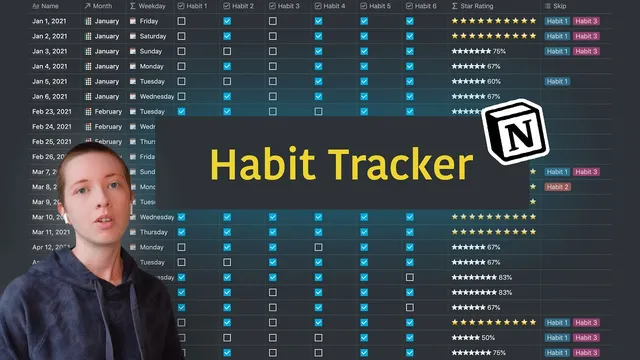
How To Make A Habit Tracker In Notion (w/ Skip Habit Option)
Based on Red Gregory's video on YouTube. If you like this content, support the original creators by watching, liking and subscribing to their content.
Use unary plus on checkbox properties to convert checked habits into numeric values for progress calculations.
Briefing
A Notion habit tracker can be upgraded to support “skip habits” on specific days—then those skips flow through to a monthly analytics dashboard that shows real-time average progress. The key move is building a progress formula that counts only the habits marked as required for a given date, so weekend (or any) exceptions don’t drag down completion rates.
The setup starts with a classic checkbox database: six habits stored as checkbox properties, plus a weekday formula that derives the day name from each entry’s date. A star-based progress bar is then created from the checkboxes by using Notion’s unary plus to convert each checkbox into a numeric value, summing them, dividing by the total number of habits, and converting the result into a percentage. Visually, the tracker uses white stars for partial completion and golden stars for full completion.
The “skip” upgrade adds a separate Skip property that lists which habits should be ignored on that day (for example, skipping habits 1 and 3 on weekends). A new Progress property recalculates completion by subtracting the skipped habits from the denominator. To do that, the formula measures how many items exist inside the Skip tags: it uses replace to strip out non-comma content, then counts commas and adds one to estimate the number of skipped habits. An if condition prevents the formula from misbehaving when Skip is empty. The result is that if only habits 2, 4, 5, and 6 are checked, progress becomes 100% instead of being diluted by habits that were intentionally skipped.
To make the skip behavior apply broadly, the tracker uses a filter approach: for every Saturday and Sunday, the Skip property is populated for the relevant habits (e.g., habits 1 and 3). This avoids manually editing each day. The Skip column can then be hidden once the logic is working.
Finally, the tracker feeds into an analytics database. A relation connects daily habit entries to a monthly analytics table, and a rollup computes the average progress across all days in that month. Because percentage rollups can get awkward, the workflow converts daily progress into a number before rolling it up. The monthly star rating is rebuilt from the rollup average: white stars show partial progress, while golden stars appear when the monthly average hits 1 (100%). The dashboard is organized by quarter and updates as new daily entries roll in, giving a running view of habit performance that respects planned exceptions.
Cornell Notes
The tracker upgrade introduces a Skip system so weekends (or any chosen days) can ignore specific habits without lowering completion scores. Daily progress is computed by summing checked habits (via unary plus) and dividing by a denominator reduced by the number of skipped habits. The number of skipped habits is derived from the Skip tags by counting commas and handling empty Skip values with an if statement. A monthly analytics database then relates to daily entries and rollups the numeric progress to compute average monthly completion. Star ratings are rendered from progress: white stars for partial completion and golden stars when progress equals 1 (100%).
How does the tracker calculate daily completion when some habits are intentionally skipped?
What’s the purpose of converting progress from a percentage into a number?
How does the formula determine how many habits are in the Skip property?
How are weekend skips applied without editing every day manually?
How are monthly star ratings generated from daily data?
Review Questions
- If Skip is empty for a day, what should the progress formula do to avoid changing the denominator incorrectly?
- Why does the monthly analytics rollup rely on numeric progress rather than a percentage value?
- How would the daily denominator change if a tracker has 8 habits and Skip lists 3 habits for a given day?
Key Points
- 1
Use unary plus on checkbox properties to convert checked habits into numeric values for progress calculations.
- 2
Create a Skip property that lists which habits should be ignored on specific dates, then subtract those habits from the progress denominator.
- 3
Count skipped habits by deriving the number of comma-separated items in Skip, and guard against empty Skip values with an if condition.
- 4
Apply skip rules at scale by filtering on weekday (e.g., Saturday/Sunday) and bulk-filling the Skip property.
- 5
Convert daily progress into a number before rollups to avoid percentage aggregation issues in Notion.
- 6
Build star ratings from progress by mapping progress (0–1) to 0–10 star icons, and switch to golden stars when progress equals 1.
- 7
Use a relation + rollup from daily entries into a monthly analytics database to show running average progress as the month progresses.