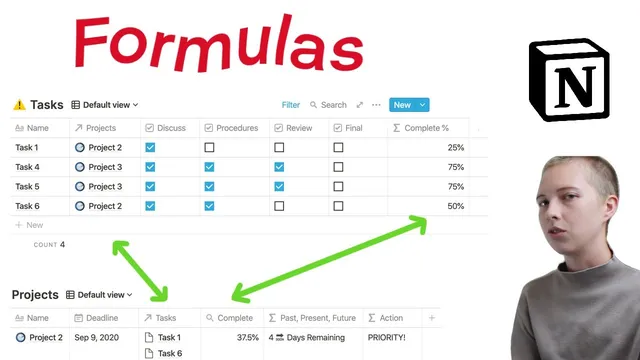
How To Use Notion Formulas | Ep. 1: Project Management (Days Remaining To Deadline)
Based on Red Gregory's video on YouTube. If you like this content, support the original creators by watching, liking and subscribing to their content.
Create a Tasks database with checkbox properties and convert checked/unchecked values into numbers using unary plus for summing.
Briefing
A Notion project-management dashboard can be built entirely with formulas by converting task checkboxes into a clean project completion percentage, then using date math to label each project as “today,” “passed,” or “future” and assign an “action” priority like urgent, priority, or archive. The practical payoff is a template-ready system: tasks roll up into projects, deadlines drive status text, and filters automatically separate active work from archived projects.
The build starts with two linked databases. A Tasks database uses four checkbox properties representing process steps (discussion, procedures, review, finalize) and a formula that returns a completion percentage. The key move is turning boolean checkboxes into numbers with unary plus (so checked becomes 1 and unchecked becomes 0), summing them, and dividing by the total number of checkbox properties. When rounding is needed, the workflow uses round/ceil/floor to control decimal behavior—then scales by 100 and divides back to keep percentages stable and readable.
Next comes a Projects database with a deadline date and a relation to tasks. Each project links to multiple tasks through a relation property, enabling rollups. A rollup named complete averages the task-level completion percentages, producing a project-level completion metric (e.g., 100% when all tasks are complete, lower values when tasks are partially done). This rollup becomes the backbone for later logic.
Deadline handling is where the formulas get more nuanced. A date-between calculation measures time from now to the deadline, but ordering matters: using now as the first argument and the deadline as the second can flip signs. To avoid confusing “negative days” for future deadlines, the formula converts the date difference into hours, divides by 24 to get days, and then uses ceil (seal) so “tomorrow” counts as 1 day remaining even late in the day. A sine-based sign check is also demonstrated as an alternative way to categorize past vs future vs today.
To produce user-friendly status text, the dashboard uses nested if statements with a three-way hierarchy: today when the computed day difference equals zero, past when the deadline is less than now, and future when the deadline is greater than now. The absolute value (abs) removes negative signs, and format converts numeric results to text so the status string can concatenate cleanly (e.g., “8 days remaining”).
Finally, an action formula assigns labels based on deadline status and completion. If the deadline is today and the project isn’t fully complete, it returns urgent. If the deadline is within eight days and completion is below a threshold, it returns priority. If completion equals 1, it returns archive. Filters then route archived projects into a separate view automatically by checking whether action contains “ARCHIVE,” while another filter keeps the default view focused on active projects. The result is a dashboard that stays current as tasks are checked off and deadlines approach—without manual updates.
Cornell Notes
The dashboard turns task checkboxes into a reliable project completion percentage, then uses deadline date math to generate human-readable status (“today,” “days remaining,” “passed”). Tasks connect to projects through a relation, and a rollup averages task completion to produce a project-level complete value. Deadline logic uses dateBetween with now and the deadline (ordering matters), converts to hours, divides by 24, and applies ceil so “tomorrow” counts as 1 day remaining. Nested if statements classify past/present/future, while abs and format make the output text-friendly for concatenation. An action formula then labels projects as urgent, priority, or archive based on deadline proximity and completion thresholds, enabling filters to separate active vs archived work.
How does unary plus make checkbox formulas work for percentages in Notion?
Why does the dateBetween formula need careful argument ordering, and how is it corrected?
What’s the purpose of switching from days to hours and using ceil?
How does the dashboard generate “today / passed / future” text without time-of-day breaking equality checks?
Why use abs, format, and concatenation in the status cell?
How does the action formula decide between urgent, priority, and archive?
Review Questions
- In what order should dateBetween arguments be arranged to avoid negative “days remaining” for future deadlines, and what symptom indicates the order is wrong?
- How do ceil and dividing by 24 work together to make “tomorrow” count as 1 day remaining in Notion?
- What combination of abs, format, and concatenation is needed to produce a status string like “8 days remaining” rather than a raw number?
Key Points
- 1
Create a Tasks database with checkbox properties and convert checked/unchecked values into numbers using unary plus for summing.
- 2
Compute project completion by summing checkbox-derived numbers, dividing by the number of checkbox properties, and using round/ceil/floor when you need cleaner percentages.
- 3
Link Tasks to Projects with a relation and use a rollup (average) to turn task completion into a project-level completion metric.
- 4
Use dateBetween with correct argument ordering, convert to hours, divide by 24, and apply ceil so day counts behave sensibly as deadlines approach.
- 5
Generate “today/past/future” labels with nested if statements that avoid direct equality to now (because now includes time).
- 6
Use abs to remove negative signs for past deadlines and format to convert numbers to text before concatenating with strings like “days remaining.”
- 7
Assign an action tag (urgent/priority/archive) using completion thresholds and deadline proximity, then drive separate filtered views from whether action contains “ARCHIVE.”